To plan and deploy Project Quay with high availability, you can use this guide for architectural patterns, prerequisites, sizing, and deployment options on-prem or in the cloud. The guide covers infrastructure, content distribution, security, and public cloud deployments.
Project Quay features and architecture
Project Quay is a distributed, highly available container image registry for the enterprise. Review the following sections for architectural patterns, core capabilities, sizing guidance, and best practices for deploying Project Quay with high availability.
Project Quay container registry platform provides secure storage, distribution, access controls, geo-replications, repository mirroring, and governance of containers and cloud-native artifacts on any infrastructure. It is available as a standalone component or as an Operator for OpenShift Container Platform, and is deployable on-prem or on a public cloud.
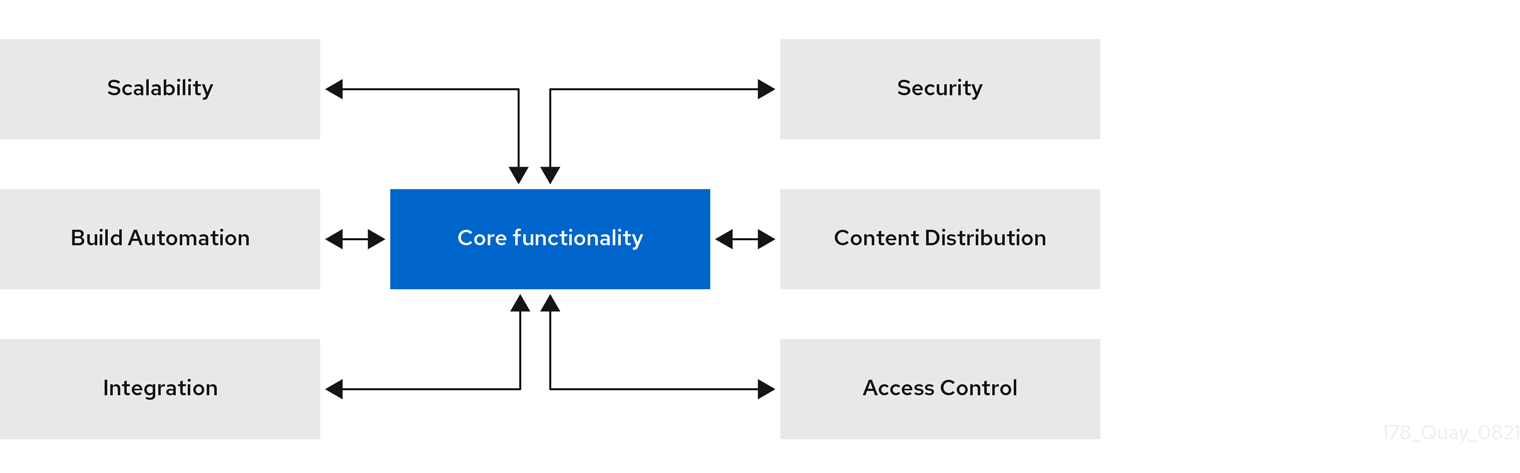
Image and artifact support
Project Quay stores and distributes container images and other OCI artifacts. It supports Docker v2, schema 2, including multi-architecture images, so teams can manage diverse workloads in one registry.
Day-2 operations
Project Quay includes operational capabilities such as custom log rotation and zero-downtime garbage collection. Red Hat provides 24/7 support for Project Quay.
Scalability and high availability (HA)
Project Quay uses the same codebase as Quay.io, Red Hat’s highly available container image registry. You can deploy at scale with high availability on-prem or in the cloud, with multitenant operation supported.
Quay.io and Project Quay offer a multitenant SaaS solution. As a result, users can be confident that their deployment can deliver at scale with high availability, whether their deployment is on-prem or on a public cloud.
Content distribution
Project Quay content distribution covers repository mirroring, geo-replication, and disconnected or air-gapped deployment. You can sync images from other registries, present multiple geo-distributed deployments as one registry, or run in air-gapped environments.
- Repository mirroring
-
Project Quay repository mirroring lets you mirror images from Project Quay and other container registries, like JFrog Artifactory, Harbor, or Sonatype Nexus Repository, into your Project Quay cluster. Using repository mirroring, you can synchronize images to Project Quay based on repository names and tags.
- Geo-replication
-
Project Quay geo-replication allows multiple, geographically distributed Project Quay deployments to work as a single registry from the perspective of a client or user. It significantly improves push and pull performance in a globally-distributed Project Quay setup. Image data is asynchronously replicated in the background with transparent failover and redirection for clients.
- Deployment in disconnected or air-gapped environments
-
Project Quay is deployable in a disconnected environment in one of two ways:
-
Project Quay and Clair connected to the internet, with an air-gapped OpenShift Container Platform cluster accessing the Project Quay registry through an explicit, allowlisted hole in the firewall.
-
Using two independent Project Quay and Clair installations. One installation is connected to the internet and another within a disconnected, or firewalled, environment. Image and vulnerability data is manually transferred from the connected environment to the disconnected environment using offline media.
-
Build automation
Project Quay build automation builds Dockerfiles on worker nodes on OpenShift Container Platform or Kubernetes. You can configure build triggers such as GitHub webhooks to build new image versions when code is committed.
Project Quay enhanced build architecture
Project Quay enhanced build architecture uses a build manager that creates Job objects and unprivileged pods running the quay-builder image. The build manager coordinates status and image builds through the quay-builder binary and Podman inside each pod.
The following image shows the expected design flow and architecture of the enhanced build features:
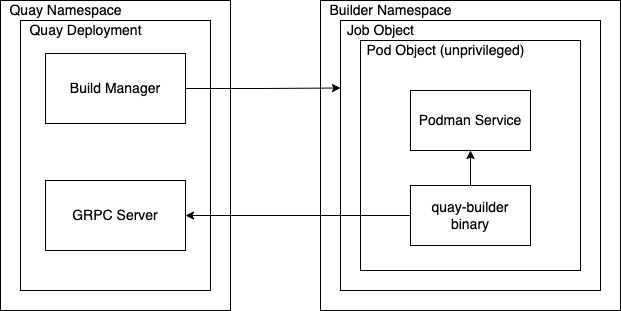
With this enhancement, the build manager first creates the Job Object. Then, the Job Object then creates a pod using the quay-builder-image. The quay-builder-image contains the quay-builder binary and the Podman service. The created pod runs as unprivileged. The quay-builder binary then builds the image while communicating status and retrieving build information from the Build Manager.
Integration
Project Quay integrates with Git-compatible systems such as GitHub, GitLab, and Bitbucket and provides a full OAuth 2 REST API. You can configure continuous builds from your repositories and manage Project Quay through the API.
REST API
Project Quay provides a full OAuth 2, RESTful API. RESTful API offers the following benefits:
-
Availability from endpoints of each Project Quay instance from the URL, for example,
https://quay-server.example.com/api/v1 -
Allow users to connect to endpoints through a browser, to
GET,DELETE,POST, andPUTProject Quay settings provided by a discovery endpoint that is usable by Swagger. -
The API can be invoked by the URL, for example,
https://quay-server.example.com/api/v1, and uses JSON objects as payload.
Security
Project Quay security includes vulnerability scanning with Clair, TLS configuration, isolated builds, and role-based access by organization and team. You can configure encryption, HTTPS, and fine-grained read, write, and administrative access.
TLS/SSL configuration
You can configure SSL/TLS for the Project Quay registry in the configuration tool UI or in the configuration bundle. SSL/TLS connections to the database, to image storage, and to Redis can also be specified through the configuration tool.
Sensitive fields in the database and at run time are automatically encrypted. You can also require HTTPS and verify certificates for the Project Quay registry during mirror operations.
Clair
Clair is an open source application that leverages static code analyses for parsing image content and reporting vulnerabilities affecting the content. Clair is packaged with Project Quay and can be used in both standalone and Operator deployments. It can be run in highly scalable configurations, where components can be scaled separately as appropriate for enterprise environments.
Project Quay Operator security
When Project Quay is deployed using the Project Quay Operator, the tls component is set to managed by default and the OpenShift Container Platform’s Certificate Authority is used to create HTTPS endpoints and to rotate TLS certificates.
If you set the tls component to unmanaged, you can provide custom certificates to the pass-through Routes, however you are responsible for certificate rotation.
Fully isolated builds
Project Quay now supports building Dockerfiles that uses both bare metal and virtual builders.
By using bare-metal worker nodes, each build is done in an ephemeral virtual machine to ensure isolation and security while the build is running. This provides the best protection against rogue payloads.
Running builds directly in a container does not have the same isolation as when using virtual machines, but it still provides good protection.
Role-based access controls
Project Quay provides full isolation of registry content by organization and team with fine-grained entitlements for read, write, and administrative access by users and automated tools.
Recently added features
Project Quay release notes list the latest features, enhancements, deprecations, and known issues. You can use them to track current product capabilities and changes.
Project Quay prerequisites
To deploy Project Quay successfully, you must provision image storage, a database, and Redis. Confirm these components are in place before deployment.
Image storage backend
Image storage for Project Quay holds all binary blobs and can be local, highly available, or geo-replicated. You can use local storage for proof of concept or choose supported object storage such as Ceph, Red Hat OpenShift Data Foundation, or cloud providers for production.
- Local storage
-
Project Quay can work with local storage, however this should only be used for proof of concept or test setups, as the durability of the binary blobs cannot be guaranteed. Mounted NFS volumes are not supported. Local storage is meant for Project Quay test-only installations.
- HA storage setup
-
For a Project Quay HA deployment, you must provide HA image storage, for example Red Hat OpenShift Data Foundation or Ceph Object Gateway (also called RADOS Gateway). Detailed instructions on how to use Ceph storage as a highly available storage backend can be found in the Quay High Availability Guide. Further information about Red Hat Ceph Storage and HA setups can be found in the Red Hat Ceph Storage Architecture Guide.
- Geo-replication
-
Local storage cannot be used for geo-replication. Geo-replication requires object storage in each region, and object storage must be geographically accessible by all other regions.
Supported image storage engines
Project Quay supports the following on premise storage types:
-
Ceph/Rados RGW
-
OpenStack Swift
-
Red Hat OpenShift Data Foundation 4 (through NooBaa)
Project Quay supports the following public cloud storage engines:
-
Amazon Web Services (AWS) S3
-
Google Cloud Storage
-
Azure Blob Storage
-
Hitachi Content Platform (HCP)
Database backend
The Project Quay database backend stores registry metadata such as users, organizations, images, and tags. PostgreSQL is the preferred database for Project Quay and Clair.
Support for MySQL and MariaDB as the database backend is deprecated since the Project Quay 3.6 release and is planned for removal. Until then, MySQL remains supported according to the support matrix, but does not receive additional features or explicit testing coverage. The Project Quay Operator supports only PostgreSQL deployments when the database is managed. If you want to use MySQL, you must deploy it manually and set the database component to managed: false.
Deploying Project Quay in a highly available (HA) configuration requires that your database services are provisioned for high availability. If Project Quay is running on public cloud infrastructure, use the PostgreSQL services that your cloud provider offers; MySQL is also supported. PostgreSQL includes the features needed to support Clair security scanning; MySQL can run the registry database but does not provide the Clair features that PostgreSQL does.
When you use Clair vulnerability scanning, plan a separate PostgreSQL database for Clair. Do not use the same PostgreSQL database for both Project Quay and Clair. The Operator can manage a Clair database (clairpostgres), or you can provision Clair’s database yourself.
Geo-replication requires a single, shared database that is accessible from all regions.
Redis backend
Project Quay uses Redis to support backend tasks such as live builder logs, user events, and the locking mechanism that is required for garbage collection. Redis data is ephemeral.
You do not need high availability for Redis because the data is not persistent. If Redis fails, you will lose access to build logs, builders, and the garbage collector service. Additionally, user events will be unavailable.
For geo-replication, a single Redis cache is shared across the entire Project Quay setup and must be accessible by all Project Quay pods.
You can use a Redis image from the Red Hat Software Collections or from any other source you prefer.
Project Quay infrastructure
Project Quay infrastructure options range from all-in-one to highly available and geo-distributed, on standalone hosts or on OpenShift Container Platform.
You can deploy standalone with automation or use the Project Quay Operator for OpenShift Container Platform for managed deployment, scaling, and integration. Project Quay runs on any physical or virtual infrastructure, both on premise or public cloud.
Running Project Quay on standalone hosts
You can automate the standalone deployment process by using Ansible or another automation suite. All standalone hosts require valid a Red Hat Enterprise Linux (RHEL) subscription.
- Proof of Concept deployment
-
Project Quay runs on a machine with image storage, containerized database, Redis, and optionally, Clair security scanning.
- Highly available setups
-
Project Quay and Clair run in containers across multiple hosts. You can use
systemdunits to ensure restart on failure or reboot.High availability setups on standalone hosts require customer-provided load balancers, either low-level TCP load balancers or application load balancers, capable of terminating TLS.
Running Project Quay on OpenShift Container Platform
The Project Quay Operator for OpenShift Container Platform provides the following features:
-
Automated deployment and management of Project Quay with customization options
-
Management of Project Quay and all of its dependencies
-
Automated scaling and updates
-
Integration with existing OpenShift Container Platform processes like GitOps, monitoring, alerting, logging
-
Provision of object storage with limited availability, backed by the multi-cloud object gateway (NooBaa), as part of the Red Hat OpenShift Data Foundation (ODF) Operator. This service does not require an additional subscription.
-
Scaled-out, high availability object storage provided by the ODF Operator. This service requires an additional subscription.
Project Quay can run on OpenShift Container Platform infrastructure nodes. As a result, no further subscriptions are required. Running Project Quay on OpenShift Container Platform has the following benefits:
-
Simplified deployment: Simplified deployment of Project Quay and associated components means that you can start using the product immediately
-
Scalability: Use cluster compute capacity to manage demand through automated scaling, based on actual load
-
Simplified Networking: Automated provisioning of load balancers and traffic ingress secured through HTTPS using OpenShift Container Platform TLS certificates and Routes
-
Declarative configuration management: Configurations stored in CustomResource objects for GitOps-friendly lifecycle management
-
Repeatability: Consistency regardless of the number of replicas of Project Quay and Clair
-
OpenShift integration: Additional services to use OpenShift Container Platform Monitoring and Alerting facilities to manage multiple Project Quay deployments on a single cluster
Integrating standalone Project Quay with OpenShift Container Platform
While the Project Quay Operator ensures seamless deployment and management of Project Quay running on OpenShift Container Platform, it is also possible to run Project Quay in standalone mode and then serve content to one or many OpenShift Container Platform clusters, wherever they are running.
The following figure shows integrating standalone Project Quay with OpenShift Container Platform:
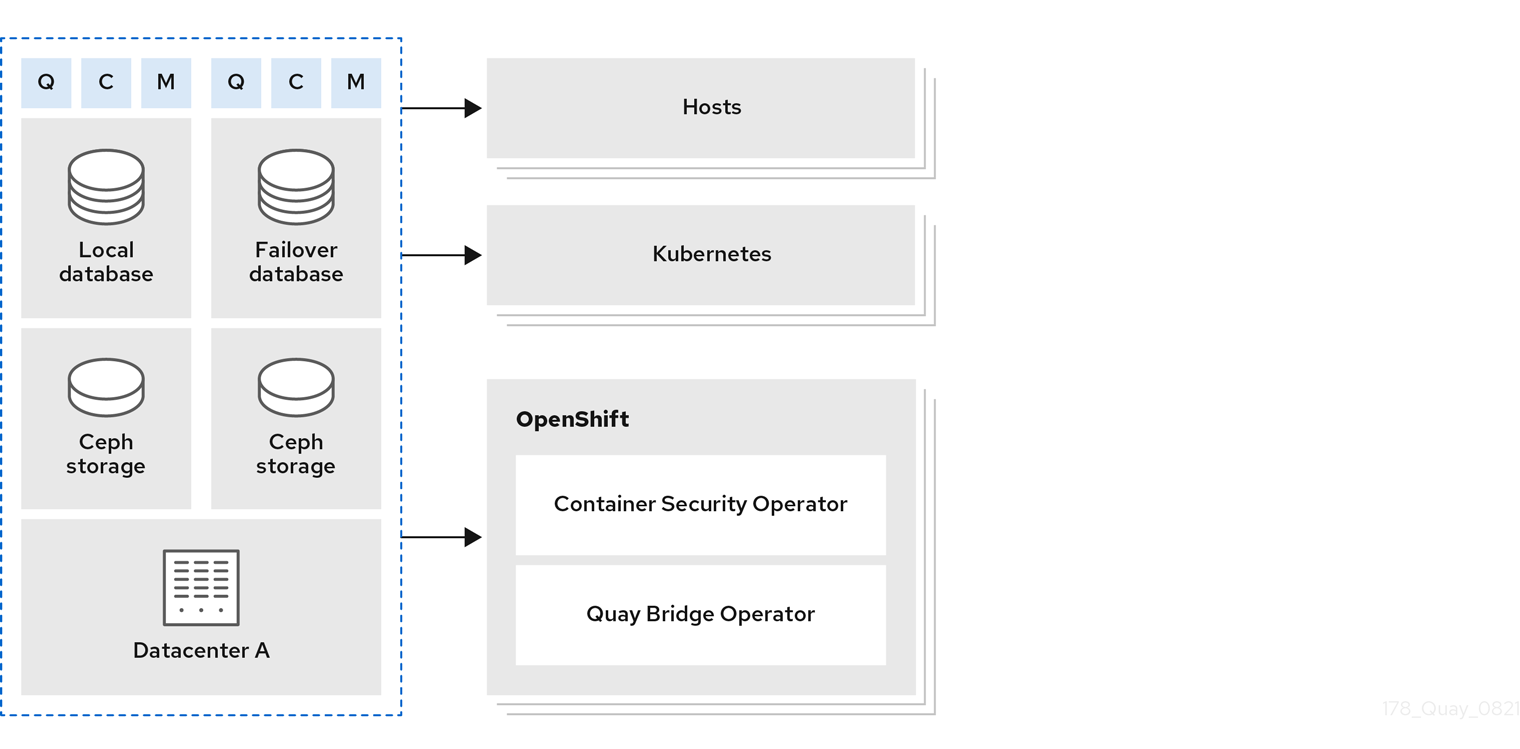
The following Operator is available to help integrate standalone and Operator based deployments of Project Quay with OpenShift Container Platform:
- Quay Bridge Operator
-
Ensures seamless integration and user experience by using Project Quay with OpenShift Container Platform in conjunction with OpenShift Container Platform Builds and ImageStreams
Mirror registry for Red Hat OpenShift
The mirror registry for OpenShift Container Platform is a small-scale Project Quay deployment for disconnected cluster installation. You can use it to mirror OpenShift Container Platform release images before you deploy a production-grade registry.
The mirror registry for Red Hat OpenShift is a small-scale version of Project Quay that you can use as a target for mirroring the required container images of OpenShift Container Platform for disconnected installations.
For disconnected deployments of OpenShift Container Platform, a container registry is required to execute the installation of the clusters. To run a production-grade registry service on such a cluster, you must create a separate registry deployment to install the first cluster. The mirror registry for Red Hat OpenShift addresses this need and is included in every OpenShift Container Platform subscription. You can download it from the OpenShift console Downloads page.
The mirror registry for Red Hat OpenShift allows users to install a small-scale version of Project Quay and its required components using the mirror-registry command line interface (CLI) tool. The mirror registry for Red Hat OpenShift is deployed automatically with pre-configured local storage and a local database. It also includes auto-generated user credentials and access permissions with a single set of inputs and no additional configuration choices to get started.
The mirror registry for Red Hat OpenShift provides a pre-determined network configuration and reports deployed component credentials and access URLs upon success. A limited set of optional configuration inputs like fully qualified domain name (FQDN) services, superuser name and password, and custom TLS certificates are also provided. This provides users with a container registry so that they can easily create an offline mirror of all OpenShift Container Platform release content when running OpenShift Container Platform in restricted network environments.
The mirror registry for Red Hat OpenShift is limited to hosting images that are required to install a disconnected OpenShift Container Platform cluster, such as release images or Operator images. It uses local storage. Content built by customers should not be hosted by the mirror registry for Red Hat OpenShift.
Unlike Project Quay, the mirror registry for Red Hat OpenShift is not a highly-available registry. Only local file system storage is supported. Using the mirror registry for Red Hat OpenShift with more than one cluster is discouraged, because multiple clusters can create a single point of failure when updating your cluster fleet. Use the mirror registry for Red Hat OpenShift to install a cluster that can host a production-grade, highly available registry such as Project Quay, which can serve OpenShift Container Platform content to other clusters.
Choosing a single registry or multiple registries
A single shared Project Quay registry can serve many clusters and data centers with organizations, RBAC, and geo-replication. You can avoid multiple distinct registries and reduce storage, infrastructure, and operational costs in most scenarios.
Many users consider running multiple, distinct registries. The preferred approach with Project Quay is to have a single, shared registry:
-
If you want a clear separation between development and production images, or a clear separation by content origin, for example, keeping third-party images distinct from internal ones, you can use organizations and repositories, combined with role-based access control (RBAC), to achieve the desired separation.
-
Given that the image registry is a critical component in an enterprise environment, you may be tempted to use distinct deployments to test upgrades of the registry software to newer versions. The Project Quay Operator updates the registry for patch releases as well as minor or major updates. This means that any complicated procedures are automated and, as a result, you do not need to provision multiple instances of the registry to test the upgrade.
-
With Project Quay, you do not need a separate registry for each cluster you deploy. Project Quay is proven to work at scale at Quay.io, and can serve content to thousands of clusters.
-
Even if you have deployments in multiple data centers, you can still use a single Project Quay instance to serve content to multiple physically-close data centers, or use the HA functionality with load balancers to stretch across data centers. Alternatively, you can use the Project Quay geo-replication feature to stretch across physically distant data centers. This requires the provisioning of a global load balancer or DNS-based geo-aware load balancing.
-
One scenario where it may be appropriate to run multiple distinct registries, is when you want to specify different configuration for each registry.
In summary, running a shared registry helps you to save storage, infrastructure and operational costs, but a dedicated registry might be needed in specific circumstances.
Example deployment topologies
Project Quay deployment examples include standalone proof of concept, highly available multi-host, and OpenShift Container Platform with the Project Quay Operator. You can reference these examples when planning your registry topology.
The following image shows examples for on premise configuration, for the following types of deployments:
-
Standalone Proof of Concept
-
Highly available deployment on multiple hosts
-
Deployment on an OpenShift Container Platform cluster by using the Project Quay Operator
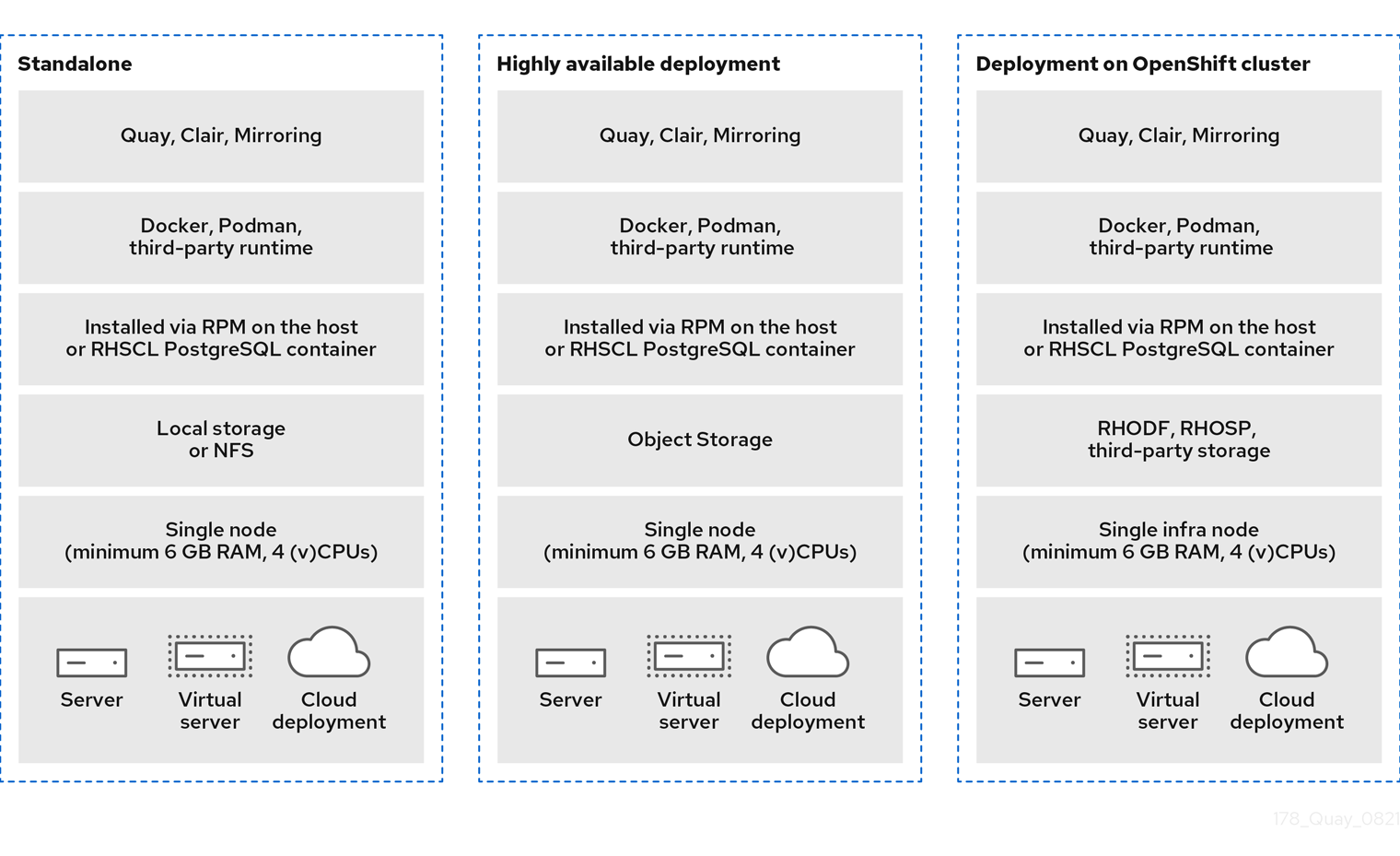
Project Quay example deployments
Example Project Quay deployments include proof of concept on a single node, highly available in a single data center, and highly available across multiple data centers. You can reference these examples when planning your deployment.
The following image shows three possible deployments for Project Quay:
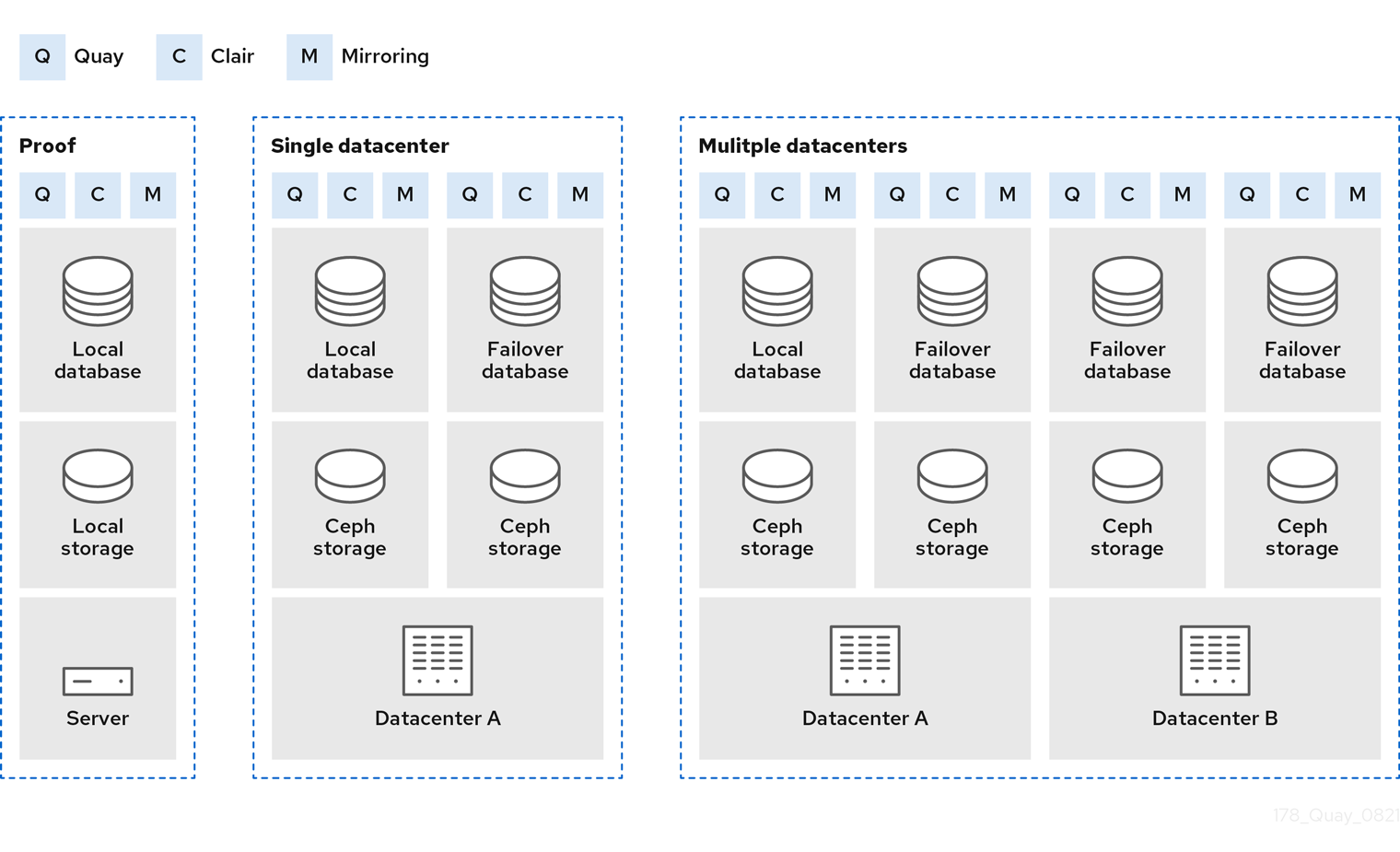
- Proof of Concept
-
Running Project Quay, Clair, and mirroring on a single node, with local image storage and local database
- Single data center
-
Running highly available Project Quay, Clair ,and mirroring, on multiple nodes, with HA database and image storage
- Multiple data centers
-
Running highly available Project Quay, Clair, and mirroring, on multiple nodes in multiple data centers, with HA database and image storage
Project Quay deployment topology
Project Quay deployment topology sends pushes, UI, and API traffic to public endpoints and serves pulls from object storage. You can use this overview to understand traffic flow in your deployment.
The following image provides a high level overview of a Project Quay deployment topology:
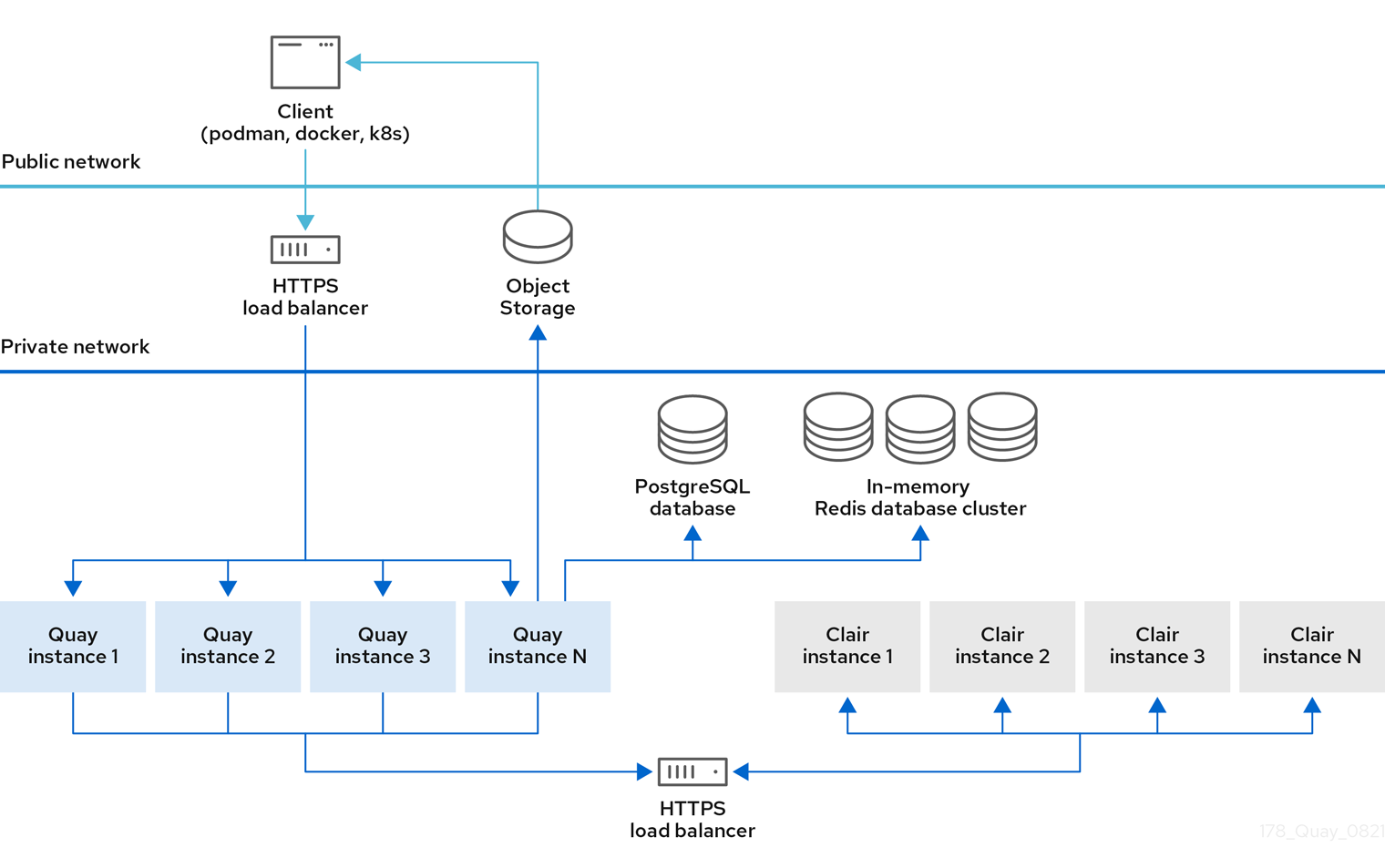
In this deployment, all pushes, user interface, and API requests are received by public Project Quay endpoints. Pulls are served directly from object storage.
Project Quay deployment topology with storage proxy
Project Quay deployment topology with storage proxy routes all traffic, including pulls, through the public endpoint. You can use this topology when clients cannot access object storage directly or when you need a single entry point.
The following image provides a high level overview of a Project Quay deployment topology with storage proxy configured:
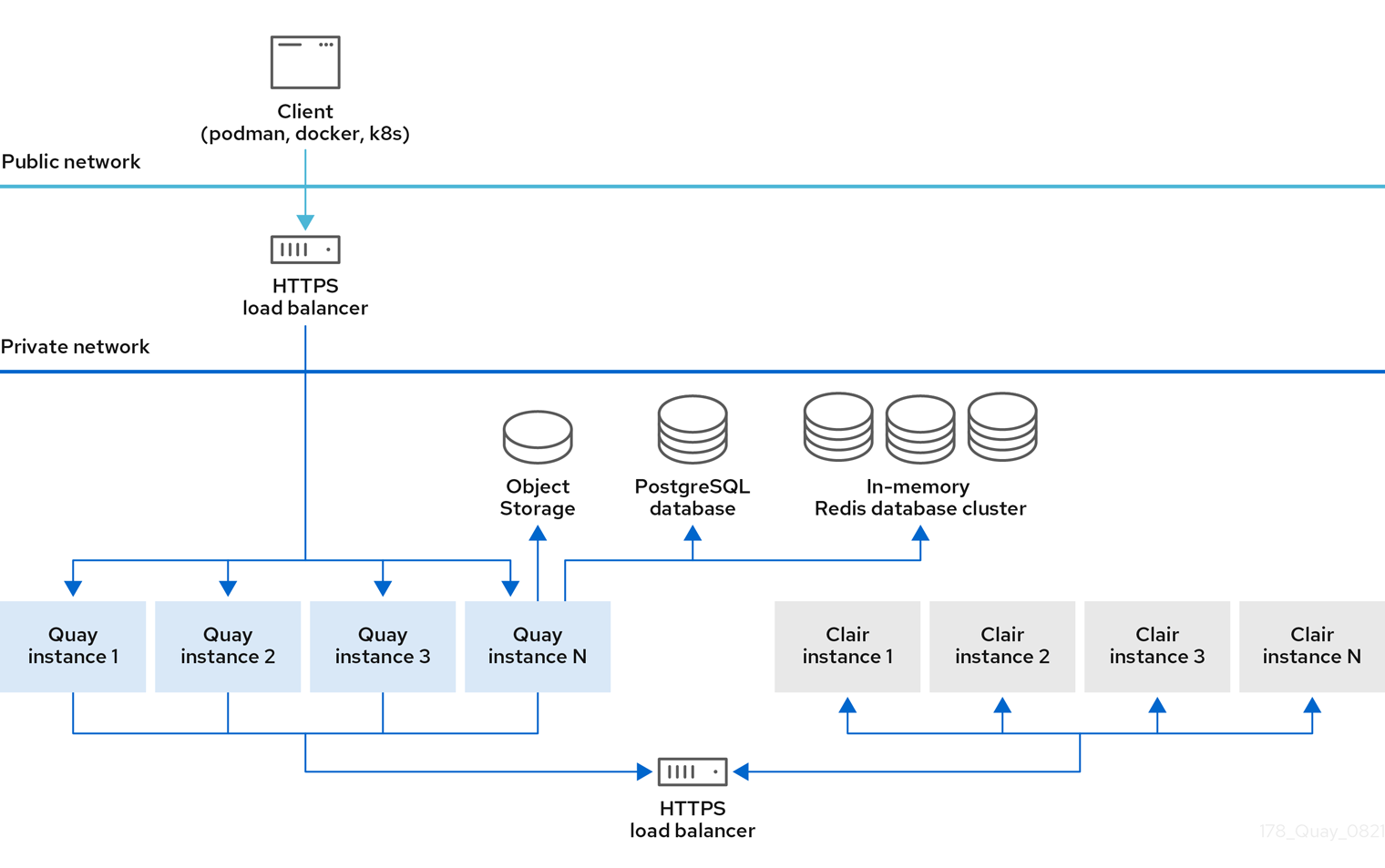
With storage proxy configured, all traffic passes through the public Project Quay endpoint.
Public cloud deployment options
Project Quay runs on public clouds in standalone mode or when OpenShift Container Platform runs on public cloud. You can use public cloud backend services for high availability and scalability and consult tested integration documentation for supported configurations.
Recommendation: If Project Quay is running on public cloud, then you should use the public cloud services for Project Quay backend services to ensure proper high availability and scalability.
Amazon Web Services services for Project Quay
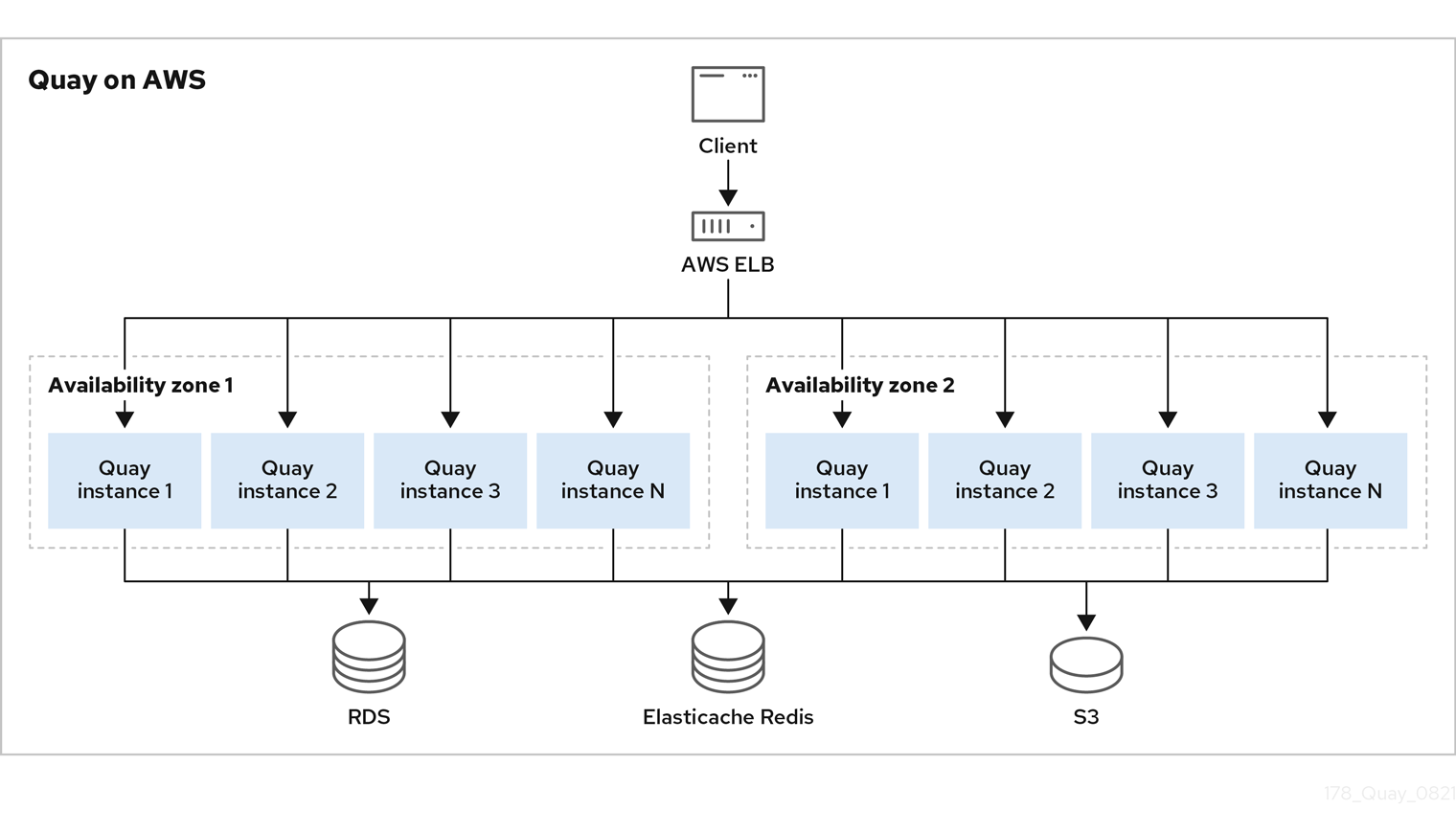
When you run Project Quay on Amazon Web Services, you can use AWS Elastic Load Balancer, S3 storage, RDS, and ElastiCache Redis for backend services. You can reference the overview and EC2 instance recommendations when planning your AWS deployment.
If Project Quay is running on Amazon Web Services (AWS), you can use the following features:
-
AWS Elastic Load Balancer
-
AWS S3 (hot) blob storage
-
AWS RDS database
-
AWS ElastiCache Redis
-
EC2 virtual machine recommendation: M3.Large or M4.XLarge
The following image provides a high level overview of Project Quay running on AWS:
Microsoft Azure services for Project Quay
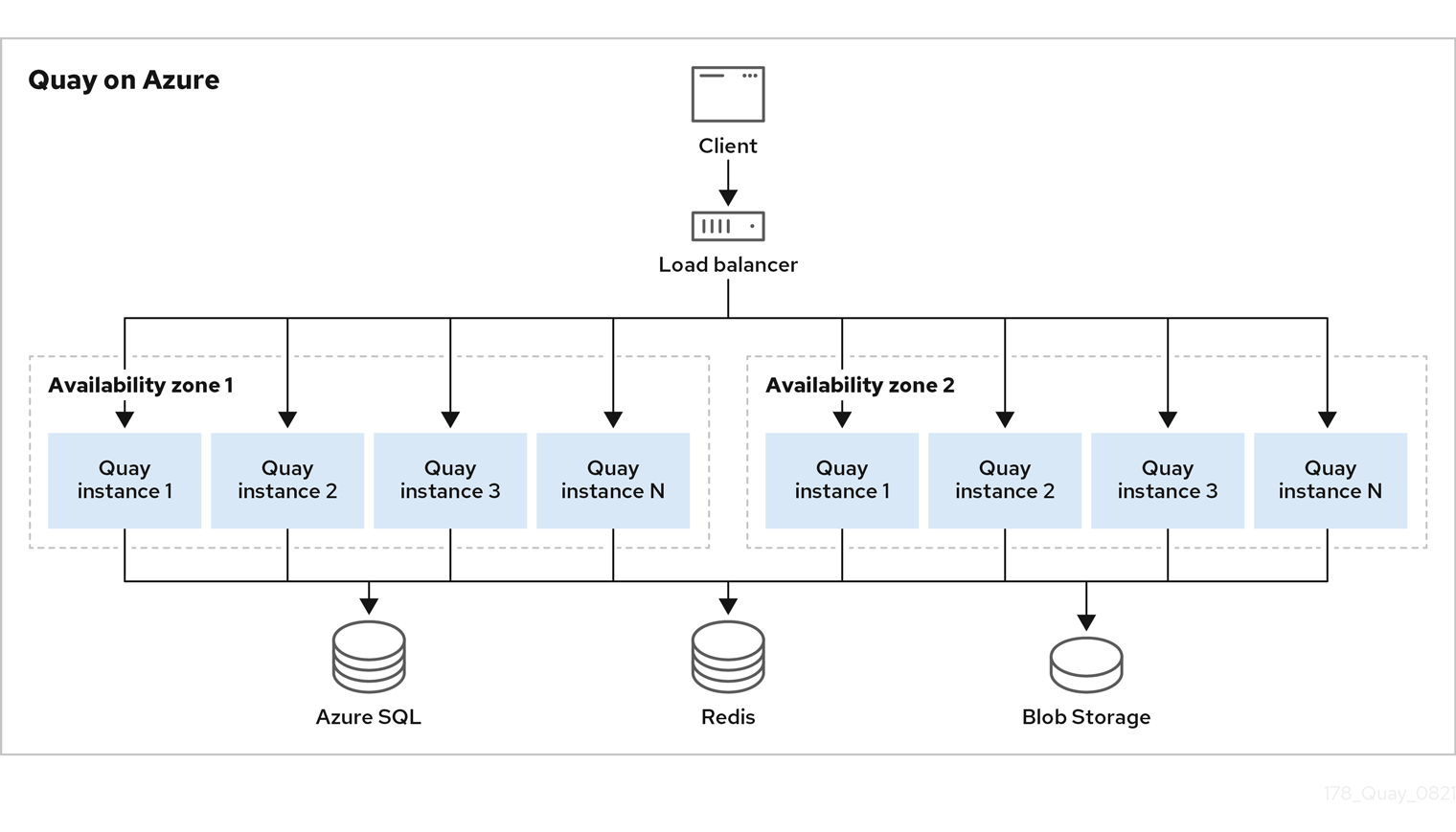
When you run Project Quay on Microsoft Azure, you can use Azure managed PostgreSQL, Blob Storage (hot), and Azure Cache for Redis for backend services. You can reference the overview when planning your Azure deployment.
The following image provides a high level overview of Project Quay running on Microsoft Azure:
Content distribution with Project Quay
Content distribution in Project Quay includes repository mirroring, geo-replication, and deployment in air-gapped environments. You can use these features to sync images across registries, replicate across regions, or run in disconnected setups.
Repository mirroring
With repository mirroring in Project Quay, you can copy images from an external registry into your cluster. You sync by repository or organization name and tag, set intervals, and filter architectures.
From a Project Quay registry with mirroring enabled, you can:
-
Choose a repository or organization from an external registry to mirror
-
Add credentials to access the external registry
-
Identify specific container image repository or organization names and tags to sync
-
Set intervals at which a repository or organization is synced
-
Check the current state of synchronization
-
Filter the architectures that are mirrored
Repository mirroring suits distinct registries that must share selected upstream content. You can configure mirroring in the Project Quay configuration file or by using the Project Quay API when you are ready to implement it.
Using mirroring
Repository mirroring in Project Quay syncs images for a repository or organization from an external registry. Filters, robot accounts, and sync intervals control what is copied and when.
The following list shows features and limitations of Project Quay mirroring for a repository or organization.
|
Note
|
The word entity is used in the mirroring documentation to refer to either a repository or organization. |
-
With mirroring, you can mirror an entire entity or selectively limit which images are synced. Filters can be based on a comma-separated list of tags, a range of tags, or other means of identifying tags through Unix shell-style wildcards.
-
After you set mirroring for an entity, you cannot manually add other images to that entity.
-
Because the mirrored entity is based on the entity and the tags that you set, the entity holds only the content represented by the entity and tag pair. For example, if you change the tag so that some images in the entity no longer match, those images are deleted.
-
Only the designated robot can push images to a mirrored entity, superseding any role-based access control permissions set on the entity.
-
Mirroring can be configured to roll back on failure, or to run on a best-effort basis.
-
With a mirrored entity, a user with read permissions can pull images from the entity but cannot push images to the entity.
-
Changing settings on your mirrored entity can be performed in the Project Quay user interface.
-
Images are synced at set intervals, but can also be synced on demand.
-
In the current implementation of organization-level repository mirroring, Project Quay does not replicate deletions from the source registry. If any of the following entities are removed or absent in the upstream source, they persist in the local Project Quay mirror:
-
Source namespaces or organizations and their repositories. If the entire upstream source namespace (for example, a Harbor project or Project Quay organization) is removed, all previously mirrored repositories and their content remain in the local mirror.
-
Individual repositories. Repositories previously discovered and synced continue to be tracked and served even if removed from the upstream source.
-
Image tags. Tags that existed at the time of the last sync persist in the mirror even if deleted upstream.
-
Referrers. OCI Referrers API artifacts, such as Cosign signatures and SBOMs, are not currently mirrored. When present locally, they are not cleaned up automatically.
-
-
The downstream mirror acts as a cumulative archive. If an upstream namespace is emptied or its repositories and tags are removed, the mirror continues to serve the last successfully synchronized versions of those objects. This might lead to higher storage consumption in the mirror than in the source.
NoteThis behavior differs from repository-level mirroring, which automatically removes local tags that are no longer present in the source registry.
Manual deletion by using the Project Quay UI or API is required to remove these entities from the mirror. A future release can introduce a configurable option to automatically delete absent items, including organizations, repositories, tags, referrers, and manifest list children from the local mirror.
Repository mirroring capacity considerations
For Project Quay repository mirroring, you can run mirroring workers on any node and size the number of workers to how many repositories you want to sync in parallel.
When you plan mirroring capacity, consider the following:
-
Mirroring workers can run on nodes that already run Project Quay.
-
Mirroring runs in scheduled batches. More workers allow more repositories to sync at the same time. For example, 10 workers can run 10 mirroring operations in parallel.
-
Size workers based on how many repositories you need to mirror in parallel, how many images and tags those repositories contain, and how often content changes.
-
Multiple tags in the same repository cannot be mirrored in parallel.
Event notifications for mirroring
Project Quay repository mirroring supports three event notifications: Mirror Started, Mirror Success, and Mirror Unsuccessful. You can configure them per repository in the Settings tab and deliver them by email, Slack, the UI, or webhooks.
The events can be configured inside of the Settings tab for each repository, and all existing notification methods such as email, Slack, Quay UI, and webhooks are supported.
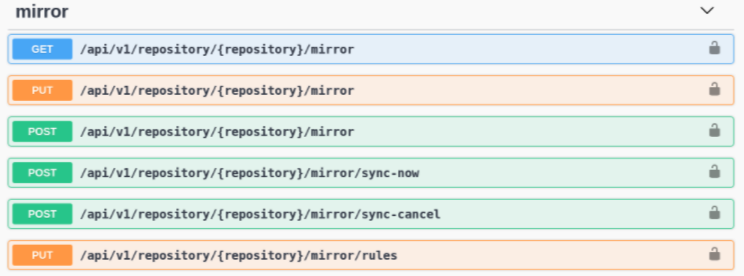
Mirroring API
You can use the Project Quay API to configure repository mirroring programmatically. The API Guide documents the available mirroring endpoints.
Geo-replication
Geo-replication connects multiple geographically distributed Project Quay deployments so that clients use them as a single registry. Standalone and Operator-based deployments support geo-replication.
With geo-replication, regions share one database and one Redis instance while each region keeps local object storage. Clients push and pull through a common entrypoint, typically a global load balancer, and blob data replicates asynchronously between storage backends.
Geo-replication features
With geo-replication in Project Quay, image pushes go to the nearest storage backend and data replicates in the background so that pulls can use the closest available engine.
The following are the key features of geo-replication:
-
When geo-replication is configured, container image pushes are written to the preferred storage engine for that Project Quay instance. This is typically the nearest storage backend within the region.
-
After the initial push, image data is replicated in the background to other storage engines.
-
The list of replication locations is configurable and those can be different storage backends.
-
An image pull always uses the closest available storage engine to maximize pull performance.
-
If replication has not been completed yet, the pull uses the source storage backend instead.
Geo-replication requirements and constraints
Project Quay geo-replication requires shared storage, database, Redis, network access between regions, and a global load balancer. Review these constraints before you deploy.
The following are the requirements and constraints for geo-replication:
-
In geo-replicated setups, Project Quay requires that all regions are able to read and write to all other regions' object storage. Object storage must be geographically accessible by all other regions.
-
Project Quay has no internal awareness of object storage health. Plan a global load balancer that monitors site and storage health and redirects clients when a site must be taken offline.
-
Geo-replication does not automatically fail over object storage. If one site’s storage is unavailable, you must shut down that site’s Project Quay deployment so the load balancer can send clients to healthy sites. Otherwise, clients experience pull and push failures.
-
Geo-replication is asynchronous. Permanent loss of a site can lose blobs that were stored there but not yet replicated.
-
A single database, and therefore all metadata and Project Quay configuration, is shared across all regions. Geo-replication does not replicate the database and does not fail over to another database.
-
A single Redis cache is shared across the entire Project Quay setup and must be accessible by all Project Quay pods.
-
Use the same configuration across regions, except for the preferred storage backend per region.
-
Geo-replication requires object storage in each region. It does not work with local storage.
-
Each region must be able to access every storage engine in each region, which requires a network path. A storage proxy is an alternative when direct paths are not practical.
-
The entire storage backend, for example, all blobs, is replicated. Repository mirroring, by contrast, can be limited to a repository or an image.
-
All Project Quay instances must share the same entrypoint, typically through a load balancer.
-
All Project Quay instances must have the same set of superusers, as they are defined inside the common configuration file.
-
For Operator-based geo-replication, plan a shared Clair database (typically an unmanaged Clair database) so every region uses the same vulnerability data store.
-
Geo-replication requires SSL/TLS certificates and keys.
If the above requirements cannot be met, you should instead use two or more distinct Project Quay deployments and take advantage of repository mirroring functions.
Standalone geo-replication architecture
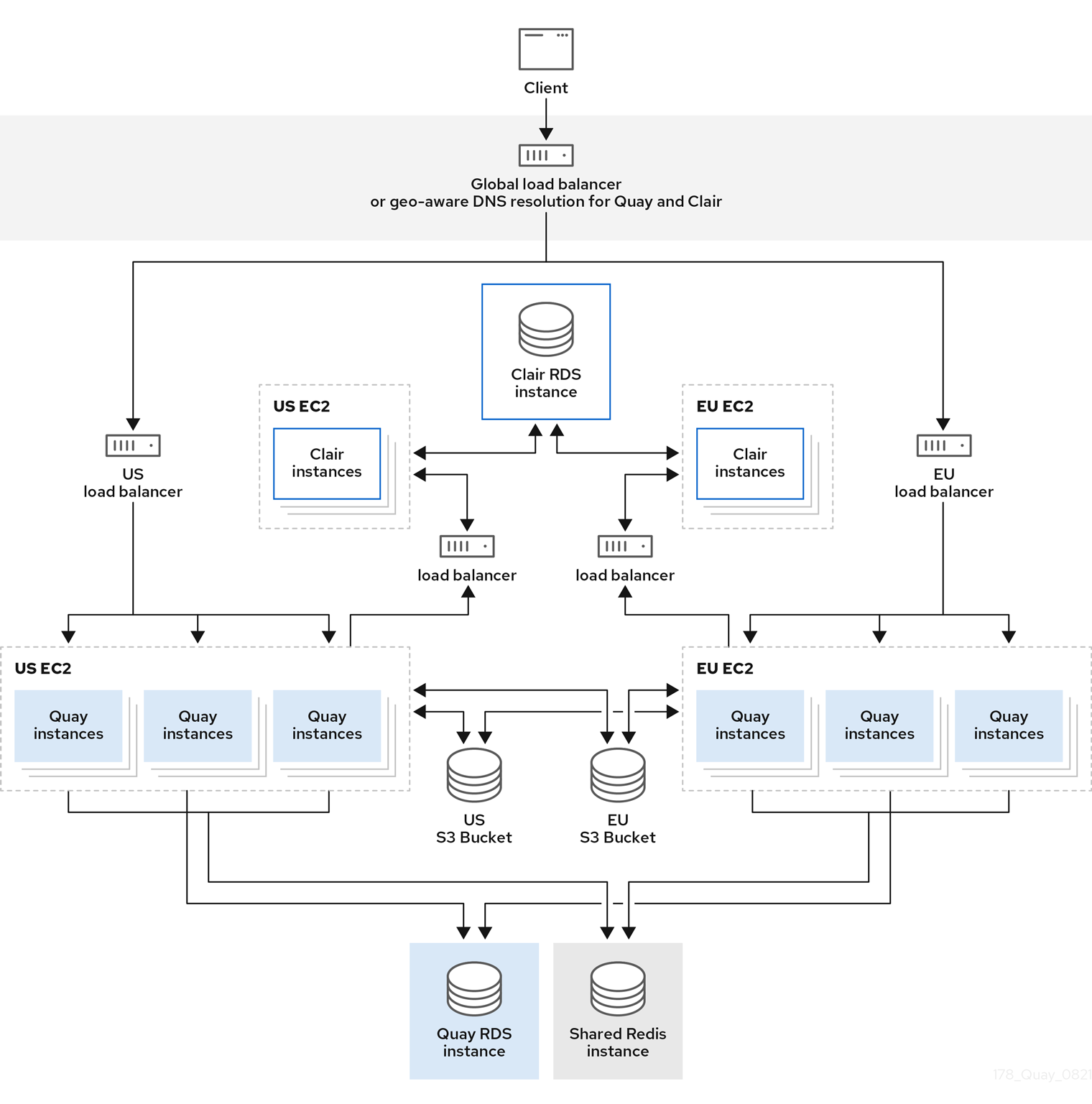
Standalone Project Quay geo-replication runs in multiple regions with a shared database and Redis and localized storage per region. Image pulls use the closest storage and pushes replicate in the background, improving performance for distributed users.
In the following image, Project Quay is running standalone in two separate regions, with a common database and a common Redis instance. Localized image storage is provided in each region and image pulls are served from the closest available storage engine. Container image pushes are written to the preferred storage engine for the Project Quay instance, and are then replicated in the background to the other storage engines.
|
Note
|
If Clair fails in one cluster, for example, the US cluster, US users would not see vulnerability reports in Project Quay for the second cluster (EU). This is because all Clair instances have the same state. When Clair fails, it is usually because of a problem within the cluster. |
Operator geo-replication architecture
Project Quay geo-replication on OpenShift Container Platform uses the Operator in multiple regions with a shared database and Redis and localized storage per region. Image pulls use the closest storage and pushes replicate in the background for distributed users.
In the following example, the Project Quay Operator is deployed in two separate regions, with a common database and a common Redis instance. Localized image storage is provided in each region and image pulls are served from the closest available storage engine. Container image pushes are written to the preferred storage engine for the Quay instance, and are then replicated in the background to the other storage engines.
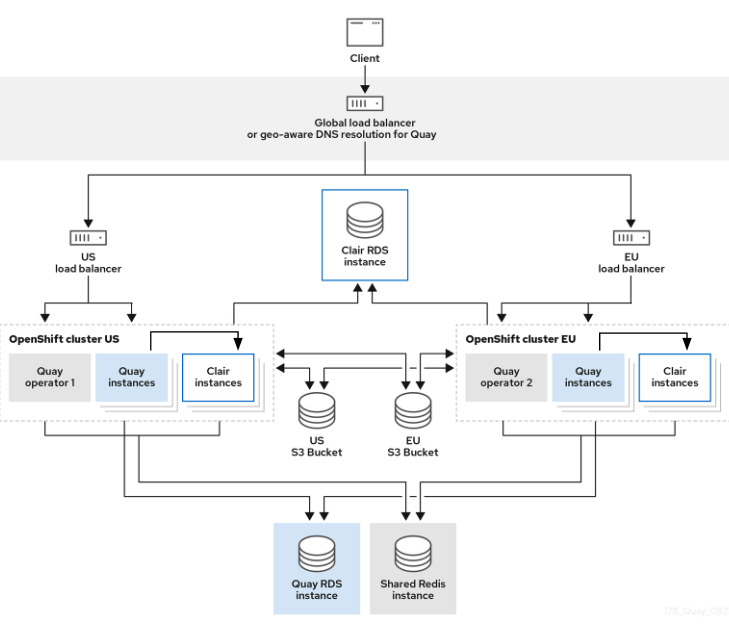
Because the Operator now manages the Clair security scanner and its database separately, geo-replication setups can be leveraged so that they do not manage the Clair database. Instead, an external shared database would be used. Project Quay and Clair support several providers and vendors of PostgreSQL, which can be found in the Project Quay 3.x test matrix. Additionally, the Operator also supports custom Clair configurations that can be injected into the deployment, which allows users to configure Clair with the connection credentials for the external database.
Mixed storage for geo-replication
Geo-replication in Project Quay can use mixed storage backends, such as public-cloud object storage and on-premise Ceph, when you secure cross-site access appropriately.
Because geo-replication supports multiple replication targets, Red Hat recommends that you use a VPN or token pair with bucket-specific access to meet security requirements. This results in the public cloud instance of Project Quay having access to on-premise storage, but the network is encrypted, protected, and uses ACLs, thereby meeting security requirements. If you cannot implement these security measures, it might be preferable to deploy two distinct Project Quay registries and to use repository mirroring as an alternative to geo-replication.
Mirroring compared to geo-replication
Mirroring and geo-replication solve different distribution needs in Project Quay. Mirroring syncs selected repositories between separate registries; geo-replication shares one database and replicates blob storage across regions.
For example, a geo-replicated Project Quay registry can use two different blob storage endpoints.
The primary use cases for geo-replication include the following:
-
Speeding up access to the binary blobs for geographically dispersed setups
-
Guaranteeing that the image content is the same across regions
Mirroring synchronizes selected repositories, or subsets of repositories, from one registry to another. The registries are distinct, with each registry having a separate database and separate image storage.
The primary use cases for mirroring include the following:
-
Independent registry deployments in different data centers or regions, where a certain subset of the overall content is supposed to be shared across the data centers and regions
-
Automatic synchronization or mirroring of selected (allowlisted) upstream repositories from external registries into a local Project Quay deployment
|
Note
|
Mirroring and geo-replication can be used simultaneously. |
| Feature / Capability | Geo-replication | Mirroring |
|---|---|---|
What is the feature designed to do? |
A shared, global registry |
Distinct, different registries |
What happens if replication or mirroring has not been completed yet? |
The remote copy is used (slower) |
No image is served |
Is access to all storage backends in both regions required? |
Yes (all Project Quay nodes) |
No (distinct storage) |
Can users push images from both sites to the same repository or organization? |
Yes |
No |
Is all registry content and configuration identical across all regions (shared database)? |
Yes |
No |
Can users select individual namespaces or repositories to be mirrored? |
No |
Yes |
Can users apply filters to synchronization rules? |
No |
Yes |
Are individual / different role-based access control configurations allowed in each region |
No |
Yes |
Air-gapped or disconnected deployments
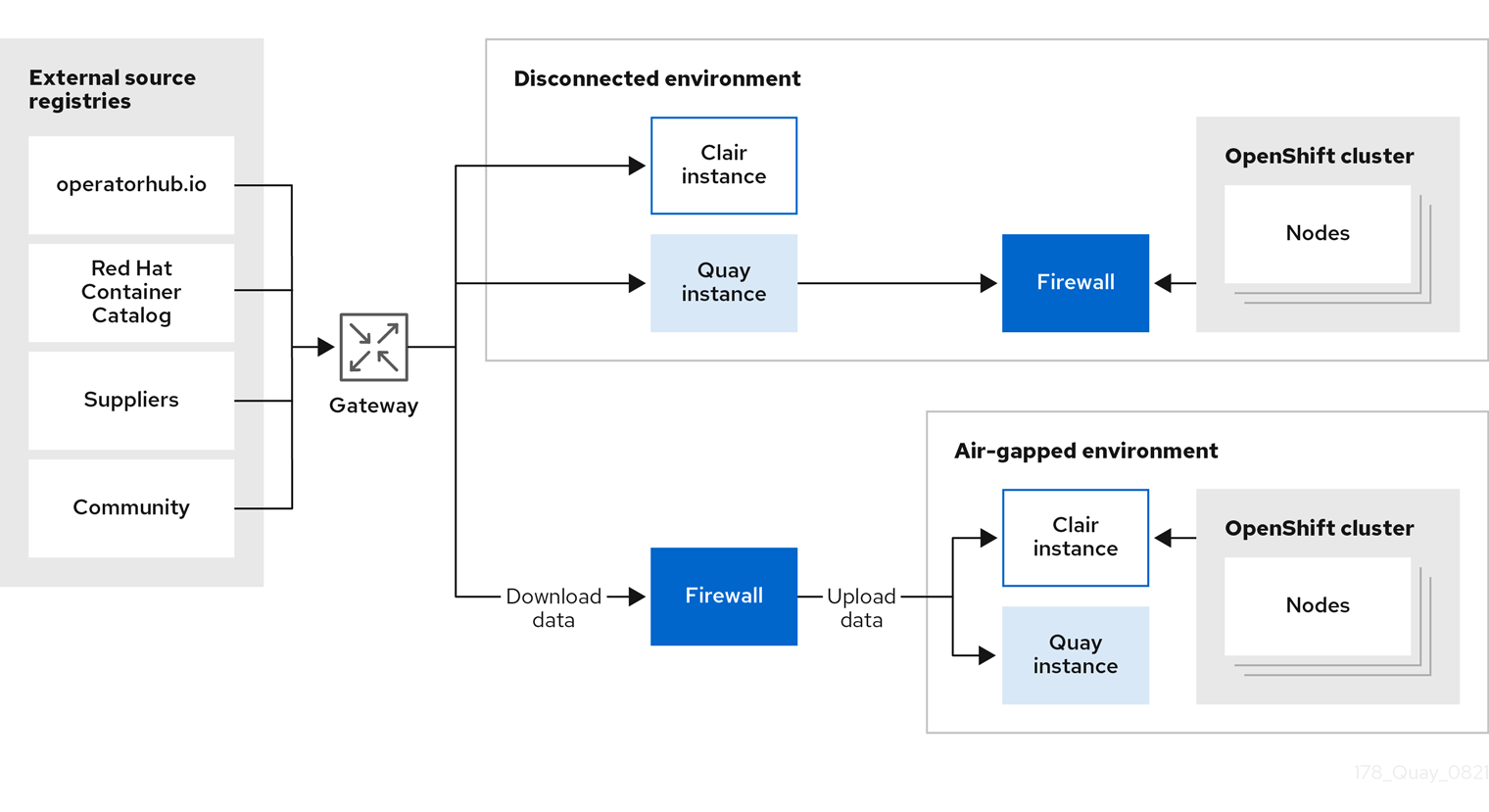
Project Quay supports air-gapped and disconnected deployments with internet-connected registries and firewall access, or fully disconnected installations with offline media transfer. You can choose the pattern that matches your network constraints.
In the following diagram, the upper deployment in the diagram shows Project Quay and Clair connected to the internet, with an air-gapped OpenShift Container Platform cluster accessing the Project Quay registry through an explicit, allowlisted hole in the firewall.
The lower deployment in the diagram shows Project Quay and Clair running inside of the firewall, with image and CVE data transferred to the target system using offline media. The data is exported from a separate Project Quay and Clair deployment that is connected to the internet.
Scalability and minimum requirements
Project Quay scales from proof of concept to large deployments such as Quay.io. You can use sample sizing tables and subscription guidance to plan capacity for your environment.
Scalability of Project Quay is one of its key strengths, with a single code base supporting a broad spectrum of deployment sizes, including the following:
-
Proof of Concept deployment on a single development machine
-
Mid-size deployment of approximately 2,000 users that can serve content to dozens of Kubernetes clusters
-
High-end deployment such as Quay.io that can serve thousands of Kubernetes clusters world-wide
Sizing depends on many factors, such as the number of users, images, concurrent pulls and pushes, so standard sizing recommendations are not available.
The following are the minimum requirements for systems running Project Quay (per container/pod instance):
-
Quay: minimum 6 GB; recommended 8 GB, 2 or more vCPUs
-
Clair: recommended 2 GB RAM and 2 or more vCPUs
-
Storage: recommended 30 GB
-
NooBaa: minimum 2 GB, 1 vCPU (when you select the
objectstoragecomponent in the Operator) -
Clair database: minimum 5 GB required for security metadata
Stateless components of Project Quay can be scaled out, but scaling increases load on stateful backend services.
Sample deployment sizes
Sample Project Quay sizing tables list approximate resources for proof of concept, mid-size, and high-end deployments. You can use these figures as a starting point and adjust based on your workload.
The following table shows approximate sizing for Proof of Concept, mid-size, and high-end deployments. Whether a deployment runs appropriately with the same metrics depends on many factors not shown below.
| Metric | Proof of concept | Mid-size | High End (Quay.io) |
|---|---|---|---|
No. of Quay containers by default |
1 |
4 |
15 |
No. of Quay containers max at scale-out |
N/A |
8 |
30 |
No. of Clair containers by default |
1 |
3 |
10 |
No. of Clair containers max at scale-out |
N/A |
6 |
15 |
No. of mirroring pods (to mirror 100 repositories) |
1 |
5-10 |
N/A |
Database sizing |
2-4 Cores; 6-8 GB RAM; 10-20 GB disk |
4-8 Cores; 6-32 GB RAM; 100 GB - 1 TB disk |
32 cores; 244 GB; 1+ TB disk |
Object storage backend sizing |
10-100 GB |
1 - 20 TB |
50+ TB up to PB |
Redis cache sizing |
2 Cores; 2-4 GB RAM |
4 cores; 28 GB RAM |
|
Underlying node sizing (physical or virtual) |
4 Cores; 8 GB RAM |
4-6 Cores; 12-16 GB RAM |
Quay: 13 cores; 56 GB RAM. Clair: 2 cores; 4 GB RAM |
Redis cache sizing applies only when you use Quay builders; otherwise Redis sizing is not significant.
Subscription options
Project Quay subscriptions are based on deployments and include Standard or Premium support. You can review subscription models and entitlements when planning your registry deployment.
|
Note
|
Deployment means an installation of a single Project Quay registry using a shared data backend. |
With a Project Quay subscription, the following options are available:
-
You can deploy any number of pods, such as Quay, Clair, Builder, and so on.
-
Project Quay pods can run in multiple data centers or availability zones.
-
Storage and database backends can be deployed across multiple data centers or availability zones, but only as a single, shared storage backend and single, shared database backend.
-
Project Quay can manage content for an unlimited number of clusters or standalone servers.
-
Clients can access the Project Quay deployment regardless of their physical location.
-
You can deploy Project Quay on OpenShift Container Platform infrastructure nodes to minimize subscription requirements.
-
You can run the Container Security Operator (CSO) and the Quay Bridge Operator (QBO) on your OpenShift Container Platform clusters at no additional cost.
|
Note
|
Project Quay geo-replication requires a subscription for each storage replication. The database, however, is shared. |
Project Quay as an external registry for OpenShift Container Platform
You can run Project Quay as an external registry in front of multiple OpenShift Container Platform clusters that use internal registries, or rely on cluster-internal registries alone. You can choose the approach that fits your image governance and distribution needs.
The required coordination of Secrets and ImageStreams is automated by the Quay Bridge Operator, which can be launched from the OperatorHub for OpenShift Container Platform.
Quota management architecture
Project Quay quota management sums blob sizes at the repository and namespace level without double-counting shared blobs. You can enforce storage limits and reject pushes when quotas are exceeded.
|
Important
|
Because manifest list totals are counted toward the repository total, the total quota consumed when upgrading from a previous version of Project Quay might be reportedly differently in Project Quay 3.9. In some cases, the new total might go over a repository’s previously-set limit. Project Quay administrators might have to adjust the allotted quota of a repository to account for these changes. |
The quota management feature works by calculating the size of existing repositories and namespace with a backfill worker, and then adding or subtracting from the total for every image that is pushed or garbage collected afterwords. Additionally, the subtraction from the total happens when the manifest is garbage collected.
|
Note
|
Because subtraction occurs from the total when the manifest is garbage collected, there is a delay in the size calculation until it is able to be garbage collected. |
The following database tables hold the quota repository size, quota namespace size, and quota registry size, in bytes, of a Project Quay repository within an organization:
-
QuotaRepositorySize -
QuotaNameSpaceSize -
QuotaRegistrySize
The organization size is calculated by the backfill worker to ensure that it is not duplicated. When an image push is initialized, the user’s organization storage is validated to check if it is beyond the configured quota limits. If an image push exceeds defined quota limitations, a soft or hard check occurs:
-
For a soft check, users are notified.
-
For a hard check, the push is stopped.
If storage consumption is within configured quota limits, the push is allowed to proceed.
Image manifest deletion follows a similar flow, whereby the links between associated image tags and the manifest are deleted. Additionally, after the image manifest is deleted, the repository size is recalculated and updated in the QuotaRepositorySize, QuotaNameSpaceSize, and QuotaRegistrySize tables.
Namespace auto-pruning architecture
Project Quay namespace auto-pruning uses database tables for policies and task status and an auto-prune worker that runs configured policies. You can use this overview to understand how policies are stored and executed.
For the namespace auto-pruning feature, two distinct database tables within a database schema were created: one for namespaceautoprunepolicy and another for autoprunetaskstatus. An auto-prune worker carries out the configured policies.
Namespace auto prune policy database table
The namespaceautoprunepolicy database table holds the policy configuration for a single namespace. There is only one entry per namespace, but there is support for multiple rows per namespace_id. The policy field holds the policy details, such as {method: "creation_date", olderThan: "2w"} or {method: "number_of_tags", numTags: 100}.
| Field | Type | Attributes | Description |
|---|---|---|---|
|
character varying (225) |
Unique, indexed |
Unique identifier for this policy |
|
Integer |
Foreign Key |
Namespace that the policy falls under |
|
text |
JSON |
Policy configuration |
Auto-prune task status database table
The autoprunetaskstatus table registers tasks to be executed by the auto-prune worker. Tasks are executed within the context of a single namespace. Only one task per namespace exists.
| Field | Type | Attributes | Description |
|---|---|---|---|
|
Integer |
Foreign Key |
Namespace that this task belongs to |
|
Big Integer (bigint) |
Nullable, indexed |
Last time that the worker executed the policies for this namespace |
|
text |
Nullable |
Details from the last execution task |
Auto-prune worker
The following sections detail information about the auto-prune worker.
- Auto-prune task creation
-
When a new policy is created in the
namespaceautoprunepolicydatabase table, a row is also created in theautoprunetasktable. This is done in the same transaction. The auto-prune worker uses the entry in theautoprunetasktable to identify which namespace it should execute policies for. - Auto-prune worker execution
-
The auto-pruning worker is an asynchronous job that executes configured policies. Its workflow is based on values in the
autoprunetasktable. When a task begins, the following occurs:
The auto-pruning worker is an asynchronous job that executes configured policies. Its workflow is based on values in the autoprunetask table. When a task begins, the following occurs:
-
The auto-prune worker starts on a set interval, which defaults at 30 seconds.
-
The auto-prune worker selects a row from
autoprunetaskwith the least, or null,last_ran_msandFOR UPDATE SKIP LOCKED.-
A null
last_ran_msindicates that the task was never ran. -
A task that has not run for the longest amount of time, or has never been run at all, is prioritized.
-
-
The auto-prune worker obtains the policy configuration from the
namespaceautoprunepolicytable.-
If no policy configuration exists, the entry from
autoprunetaskis deleted for this namespace and the procedure stops immediately.
-
-
The auto-prune worker begins a paginated loop of all repositories under the organization.
-
The auto-prune worker determines much pruning method to use based on
policy.method.
-
-
The auto-prune worker executes the pruning method with the policy configuration retrieved earlier.
-
For pruning by the number of tags: the auto-pruner worker gets the number of currently active tags sorted by creation date, and deletes the older tags to the configured number.
-
For pruning by date: the auto-pruner worker gets the active tags older than the specified time span and any tags returned are deleted.
-
-
The auto-prune worker adds audit logs of the tags deleted.
-
The
last_ran_msgets updated after a row fromautoprunetaskis selected. -
The auto-prune worker ends.