Understand Red Hat Quay capabilities and architecture
Review Red Hat Quay features, core architecture, scalability, build automation, integration, and security to evaluate whether the registry meets your requirements.
About Project Quay
Project Quay is a security-focused container registry platform for storing, distributing, and governing container images and other OCI artifacts.
You can deploy Project Quay as a standalone component or as an Operator on OpenShift Container Platform, and use it to deliver containerized software across OpenShift Container Platform and Kubernetes clusters in development and production.
Project Quay provides a single, resilient content repository with a web interface, access controls, and Continuous Integration/Continuous Deployment (CI/CD) integrations. Teams can upload and manage images in private repositories. Administrators can control who can view or change content and share images with designated teams.
Project Quay addresses container security through Clair, which scans images for known vulnerabilities and suggests remediation. The platform also integrates with CI/CD tools so that you can automate build and deployment workflows.
Project Quay supports multiple authentication and access methods, storage backends, and container image types, including custom certificates for Quay, Clair, and storage backends. It also supports small-scale and enterprise deployments. High availability configurations help organizations rely on the registry for mission-critical applications, and replication and distribution mechanisms deliver images across geographical locations.
Project Quay is regularly released with new features, bug fixes, and software updates.
Project Quay features and architecture
Project Quay is a distributed, highly available container image registry for the enterprise. Review the following sections for architectural patterns, core capabilities, sizing guidance, and best practices for deploying Project Quay with high availability.
Project Quay container registry platform provides secure storage, distribution, access controls, geo-replications, repository mirroring, and governance of containers and cloud-native artifacts on any infrastructure. It is available as a standalone component or as an Operator for OpenShift Container Platform, and is deployable on-prem or on a public cloud.
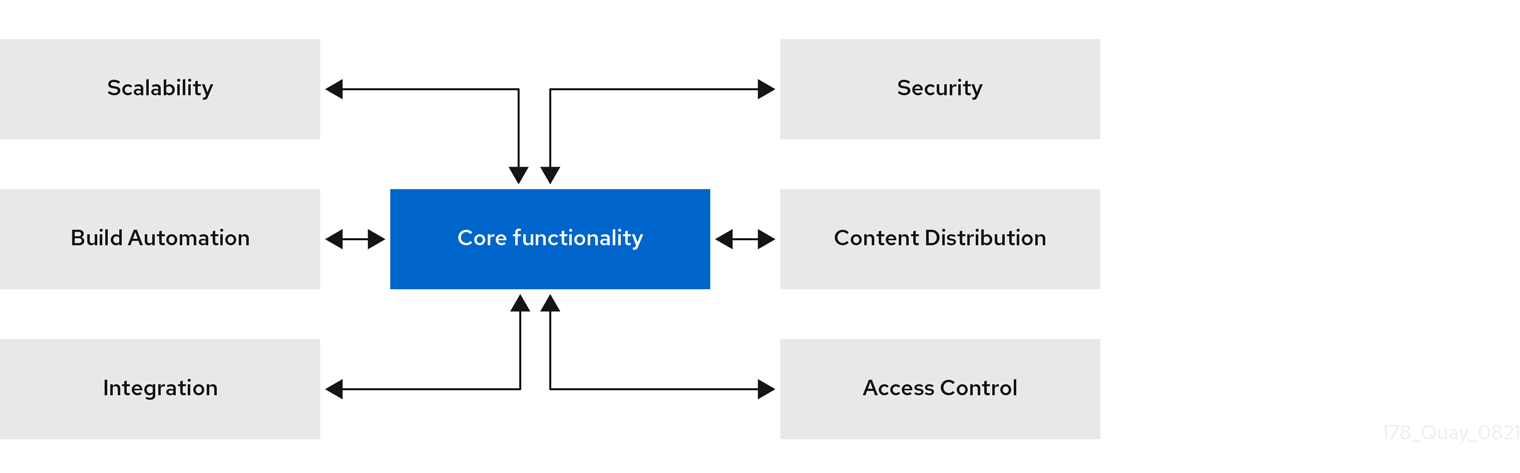
Image and artifact support
Project Quay stores and distributes container images and other OCI artifacts. It supports Docker v2, schema 2, including multi-architecture images, so teams can manage diverse workloads in one registry.
Day-2 operations
Project Quay includes operational capabilities such as custom log rotation and zero-downtime garbage collection. Red Hat provides 24/7 support for Project Quay.
Scalability and high availability (HA)
Project Quay uses the same codebase as Quay.io, Red Hat’s highly available container image registry. You can deploy at scale with high availability on-prem or in the cloud, with multitenant operation supported.
Quay.io and Project Quay offer a multitenant SaaS solution. As a result, users can be confident that their deployment can deliver at scale with high availability, whether their deployment is on-prem or on a public cloud.
Content distribution
Project Quay content distribution covers repository mirroring, geo-replication, and disconnected or air-gapped deployment. You can sync images from other registries, present multiple geo-distributed deployments as one registry, or run in air-gapped environments.
- Repository mirroring
-
Project Quay repository mirroring lets you mirror images from Project Quay and other container registries, like JFrog Artifactory, Harbor, or Sonatype Nexus Repository, into your Project Quay cluster. Using repository mirroring, you can synchronize images to Project Quay based on repository names and tags.
- Geo-replication
-
Project Quay geo-replication allows multiple, geographically distributed Project Quay deployments to work as a single registry from the perspective of a client or user. It significantly improves push and pull performance in a globally-distributed Project Quay setup. Image data is asynchronously replicated in the background with transparent failover and redirection for clients.
- Deployment in disconnected or air-gapped environments
-
Project Quay is deployable in a disconnected environment in one of two ways:
-
Project Quay and Clair connected to the internet, with an air-gapped OpenShift Container Platform cluster accessing the Project Quay registry through an explicit, allowlisted hole in the firewall.
-
Using two independent Project Quay and Clair installations. One installation is connected to the internet and another within a disconnected, or firewalled, environment. Image and vulnerability data is manually transferred from the connected environment to the disconnected environment using offline media.
-
Build automation
Project Quay build automation builds Dockerfiles on worker nodes on OpenShift Container Platform or Kubernetes. You can configure build triggers such as GitHub webhooks to build new image versions when code is committed.
Project Quay enhanced build architecture
Project Quay enhanced build architecture uses a build manager that creates Job objects and unprivileged pods running the quay-builder image. The build manager coordinates status and image builds through the quay-builder binary and Podman inside each pod.
The following image shows the expected design flow and architecture of the enhanced build features:
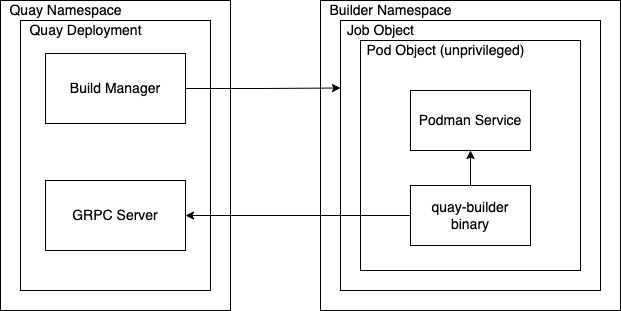
With this enhancement, the build manager first creates the Job Object. Then, the Job Object then creates a pod using the quay-builder-image. The quay-builder-image contains the quay-builder binary and the Podman service. The created pod runs as unprivileged. The quay-builder binary then builds the image while communicating status and retrieving build information from the Build Manager.
Recently added features
Project Quay release notes list the latest features, enhancements, deprecations, and known issues. You can use them to track current product capabilities and changes.
Integration
Project Quay integrates with Git-compatible systems such as GitHub, GitLab, and Bitbucket and provides a full OAuth 2 REST API. You can configure continuous builds from your repositories and manage Project Quay through the API.
REST API
Project Quay provides a full OAuth 2, RESTful API. RESTful API offers the following benefits:
-
Availability from endpoints of each Project Quay instance from the URL, for example,
https://quay-server.example.com/api/v1 -
Allow users to connect to endpoints through a browser, to
GET,DELETE,POST, andPUTProject Quay settings provided by a discovery endpoint that is usable by Swagger. -
The API can be invoked by the URL, for example,
https://quay-server.example.com/api/v1, and uses JSON objects as payload.
Security
Project Quay security includes vulnerability scanning with Clair, TLS configuration, isolated builds, and role-based access by organization and team. You can configure encryption, HTTPS, and fine-grained read, write, and administrative access.
TLS/SSL configuration
You can configure SSL/TLS for the Project Quay registry in the configuration tool UI or in the configuration bundle. SSL/TLS connections to the database, to image storage, and to Redis can also be specified through the configuration tool.
Sensitive fields in the database and at run time are automatically encrypted. You can also require HTTPS and verify certificates for the Project Quay registry during mirror operations.
Clair
Clair is an open source application that leverages static code analyses for parsing image content and reporting vulnerabilities affecting the content. Clair is packaged with Project Quay and can be used in both standalone and Operator deployments. It can be run in highly scalable configurations, where components can be scaled separately as appropriate for enterprise environments.
Project Quay Operator security
When Project Quay is deployed using the Project Quay Operator, the tls component is set to managed by default and the OpenShift Container Platform’s Certificate Authority is used to create HTTPS endpoints and to rotate TLS certificates.
If you set the tls component to unmanaged, you can provide custom certificates to the pass-through Routes, however you are responsible for certificate rotation.
Fully isolated builds
Project Quay now supports building Dockerfiles that uses both bare metal and virtual builders.
By using bare-metal worker nodes, each build is done in an ephemeral virtual machine to ensure isolation and security while the build is running. This provides the best protection against rogue payloads.
Running builds directly in a container does not have the same isolation as when using virtual machines, but it still provides good protection.
Role-based access controls
Project Quay provides full isolation of registry content by organization and team with fine-grained entitlements for read, write, and administrative access by users and automated tools.
Understand Red Hat Quay infrastructure and governance
Review how Red Hat Quay distributes content, supports air-gapped deployments, and governs storage through quotas and auto-pruning.
Project Quay infrastructure
Project Quay infrastructure options range from all-in-one to highly available and geo-distributed, on standalone hosts or on OpenShift Container Platform.
You can deploy standalone with automation or use the Project Quay Operator for OpenShift Container Platform for managed deployment, scaling, and integration. Project Quay runs on any physical or virtual infrastructure, both on premise or public cloud.
Running Project Quay on standalone hosts
You can automate the standalone deployment process by using Ansible or another automation suite. All standalone hosts require valid a Red Hat Enterprise Linux (RHEL) subscription.
- Proof of Concept deployment
-
Project Quay runs on a machine with image storage, containerized database, Redis, and optionally, Clair security scanning.
- Highly available setups
-
Project Quay and Clair run in containers across multiple hosts. You can use
systemdunits to ensure restart on failure or reboot.High availability setups on standalone hosts require customer-provided load balancers, either low-level TCP load balancers or application load balancers, capable of terminating TLS.
Running Project Quay on OpenShift Container Platform
The Project Quay Operator for OpenShift Container Platform provides the following features:
-
Automated deployment and management of Project Quay with customization options
-
Management of Project Quay and all of its dependencies
-
Automated scaling and updates
-
Integration with existing OpenShift Container Platform processes like GitOps, monitoring, alerting, logging
-
Provision of object storage with limited availability, backed by the multi-cloud object gateway (NooBaa), as part of the Red Hat OpenShift Data Foundation (ODF) Operator. This service does not require an additional subscription.
-
Scaled-out, high availability object storage provided by the ODF Operator. This service requires an additional subscription.
Project Quay can run on OpenShift Container Platform infrastructure nodes. As a result, no further subscriptions are required. Running Project Quay on OpenShift Container Platform has the following benefits:
-
Simplified deployment: Simplified deployment of Project Quay and associated components means that you can start using the product immediately
-
Scalability: Use cluster compute capacity to manage demand through automated scaling, based on actual load
-
Simplified Networking: Automated provisioning of load balancers and traffic ingress secured through HTTPS using OpenShift Container Platform TLS certificates and Routes
-
Declarative configuration management: Configurations stored in CustomResource objects for GitOps-friendly lifecycle management
-
Repeatability: Consistency regardless of the number of replicas of Project Quay and Clair
-
OpenShift integration: Additional services to use OpenShift Container Platform Monitoring and Alerting facilities to manage multiple Project Quay deployments on a single cluster
Integrating standalone Project Quay with OpenShift Container Platform
While the Project Quay Operator ensures seamless deployment and management of Project Quay running on OpenShift Container Platform, it is also possible to run Project Quay in standalone mode and then serve content to one or many OpenShift Container Platform clusters, wherever they are running.
The following figure shows integrating standalone Project Quay with OpenShift Container Platform:
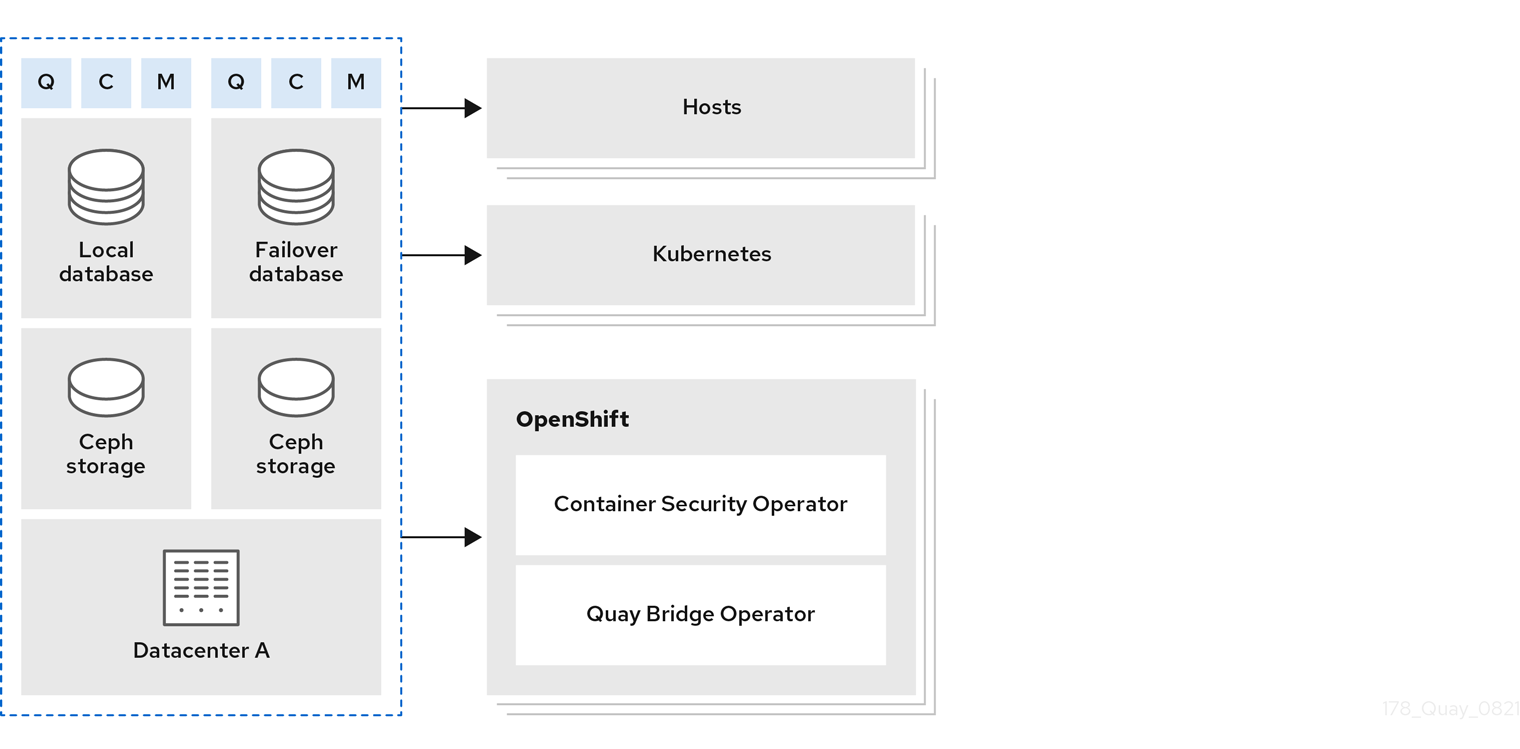
The following Operator is available to help integrate standalone and Operator based deployments of Project Quay with OpenShift Container Platform:
- Quay Bridge Operator
-
Ensures seamless integration and user experience by using Project Quay with OpenShift Container Platform in conjunction with OpenShift Container Platform Builds and ImageStreams
Repository mirroring
With repository mirroring in Project Quay, you can copy images from an external registry into your cluster. You sync by repository or organization name and tag, set intervals, and filter architectures.
From a Project Quay registry with mirroring enabled, you can:
-
Choose a repository or organization from an external registry to mirror
-
Add credentials to access the external registry
-
Identify specific container image repository or organization names and tags to sync
-
Set intervals at which a repository or organization is synced
-
Check the current state of synchronization
-
Filter the architectures that are mirrored
Repository mirroring suits distinct registries that must share selected upstream content. You can configure mirroring in the Project Quay configuration file or by using the Project Quay API when you are ready to implement it.
Mirror registry for Red Hat OpenShift
The mirror registry for OpenShift Container Platform is a small-scale Project Quay deployment for disconnected cluster installation. You can use it to mirror OpenShift Container Platform release images before you deploy a production-grade registry.
The mirror registry for Red Hat OpenShift is a small-scale version of Project Quay that you can use as a target for mirroring the required container images of OpenShift Container Platform for disconnected installations.
For disconnected deployments of OpenShift Container Platform, a container registry is required to execute the installation of the clusters. To run a production-grade registry service on such a cluster, you must create a separate registry deployment to install the first cluster. The mirror registry for Red Hat OpenShift addresses this need and is included in every OpenShift Container Platform subscription. You can download it from the OpenShift console Downloads page.
The mirror registry for Red Hat OpenShift allows users to install a small-scale version of Project Quay and its required components using the mirror-registry command line interface (CLI) tool. The mirror registry for Red Hat OpenShift is deployed automatically with pre-configured local storage and a local database. It also includes auto-generated user credentials and access permissions with a single set of inputs and no additional configuration choices to get started.
The mirror registry for Red Hat OpenShift provides a pre-determined network configuration and reports deployed component credentials and access URLs upon success. A limited set of optional configuration inputs like fully qualified domain name (FQDN) services, superuser name and password, and custom TLS certificates are also provided. This provides users with a container registry so that they can easily create an offline mirror of all OpenShift Container Platform release content when running OpenShift Container Platform in restricted network environments.
The mirror registry for Red Hat OpenShift is limited to hosting images that are required to install a disconnected OpenShift Container Platform cluster, such as release images or Operator images. It uses local storage. Content built by customers should not be hosted by the mirror registry for Red Hat OpenShift.
Unlike Project Quay, the mirror registry for Red Hat OpenShift is not a highly-available registry. Only local file system storage is supported. Using the mirror registry for Red Hat OpenShift with more than one cluster is discouraged, because multiple clusters can create a single point of failure when updating your cluster fleet. Use the mirror registry for Red Hat OpenShift to install a cluster that can host a production-grade, highly available registry such as Project Quay, which can serve OpenShift Container Platform content to other clusters.
Geo-replication
Geo-replication connects multiple geographically distributed Project Quay deployments so that clients use them as a single registry. Standalone and Operator-based deployments support geo-replication.
With geo-replication, regions share one database and one Redis instance while each region keeps local object storage. Clients push and pull through a common entrypoint, typically a global load balancer, and blob data replicates asynchronously between storage backends.
Mirroring compared to geo-replication
Mirroring and geo-replication solve different distribution needs in Project Quay. Mirroring syncs selected repositories between separate registries; geo-replication shares one database and replicates blob storage across regions.
For example, a geo-replicated Project Quay registry can use two different blob storage endpoints.
The primary use cases for geo-replication include the following:
-
Speeding up access to the binary blobs for geographically dispersed setups
-
Guaranteeing that the image content is the same across regions
Mirroring synchronizes selected repositories, or subsets of repositories, from one registry to another. The registries are distinct, with each registry having a separate database and separate image storage.
The primary use cases for mirroring include the following:
-
Independent registry deployments in different data centers or regions, where a certain subset of the overall content is supposed to be shared across the data centers and regions
-
Automatic synchronization or mirroring of selected (allowlisted) upstream repositories from external registries into a local Project Quay deployment
|
Note
|
Mirroring and geo-replication can be used simultaneously. |
| Feature / Capability | Geo-replication | Mirroring |
|---|---|---|
What is the feature designed to do? |
A shared, global registry |
Distinct, different registries |
What happens if replication or mirroring has not been completed yet? |
The remote copy is used (slower) |
No image is served |
Is access to all storage backends in both regions required? |
Yes (all Project Quay nodes) |
No (distinct storage) |
Can users push images from both sites to the same repository or organization? |
Yes |
No |
Is all registry content and configuration identical across all regions (shared database)? |
Yes |
No |
Can users select individual namespaces or repositories to be mirrored? |
No |
Yes |
Can users apply filters to synchronization rules? |
No |
Yes |
Are individual / different role-based access control configurations allowed in each region |
No |
Yes |
Air-gapped or disconnected deployments
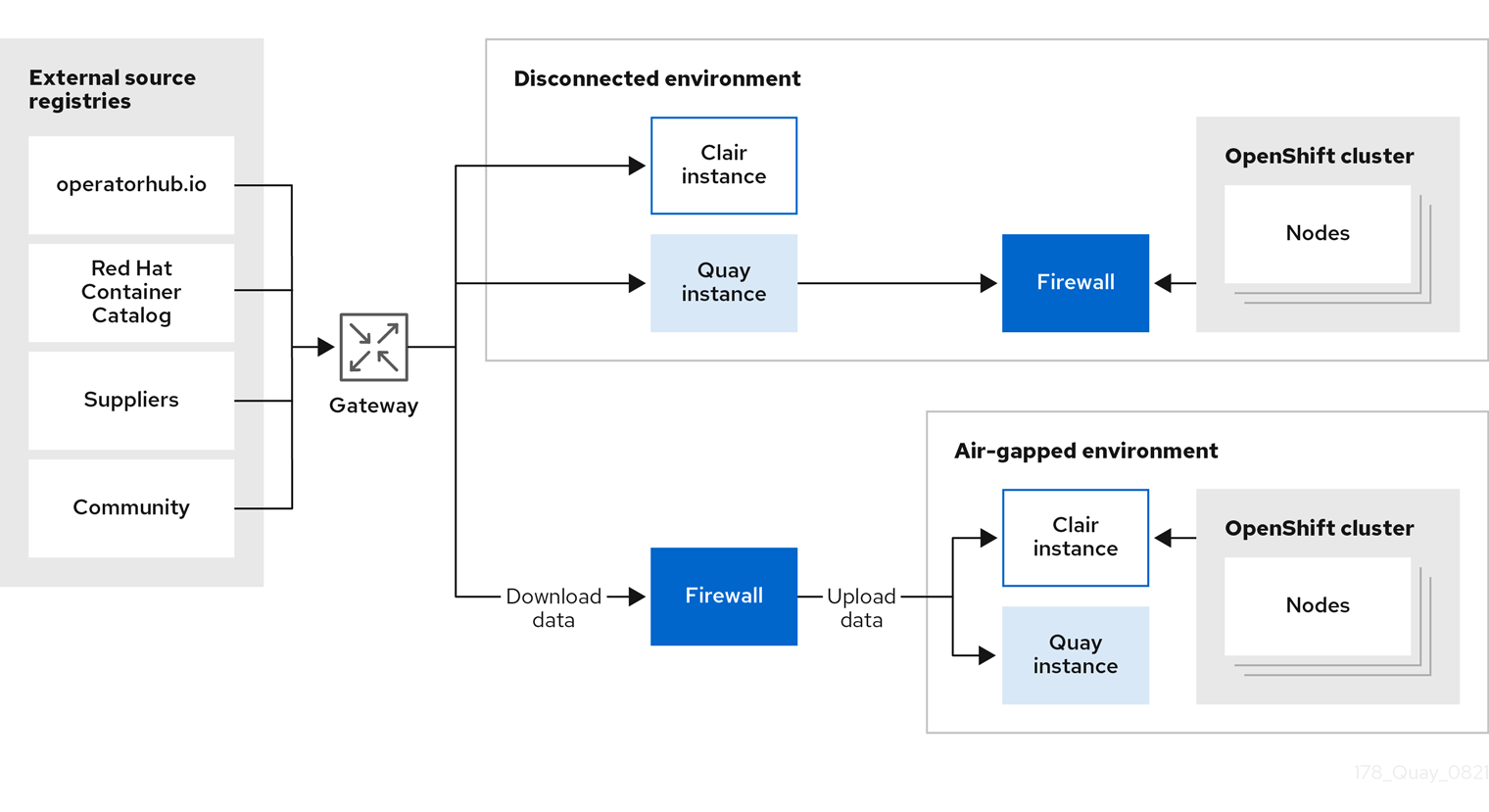
Project Quay supports air-gapped and disconnected deployments with internet-connected registries and firewall access, or fully disconnected installations with offline media transfer. You can choose the pattern that matches your network constraints.
In the following diagram, the upper deployment in the diagram shows Project Quay and Clair connected to the internet, with an air-gapped OpenShift Container Platform cluster accessing the Project Quay registry through an explicit, allowlisted hole in the firewall.
The lower deployment in the diagram shows Project Quay and Clair running inside of the firewall, with image and CVE data transferred to the target system using offline media. The data is exported from a separate Project Quay and Clair deployment that is connected to the internet.
Storage governance
Project Quay helps you control how much storage organizations and repositories consume. You can set quotas to limit growth and use auto-pruning policies to remove tags by age or count so that registries stay within those limits.
Quota management architecture
Project Quay quota management sums blob sizes at the repository and namespace level without double-counting shared blobs. You can enforce storage limits and reject pushes when quotas are exceeded.
|
Important
|
Because manifest list totals are counted toward the repository total, the total quota consumed when upgrading from a previous version of Project Quay might be reportedly differently in Project Quay 3.9. In some cases, the new total might go over a repository’s previously-set limit. Project Quay administrators might have to adjust the allotted quota of a repository to account for these changes. |
The quota management feature works by calculating the size of existing repositories and namespace with a backfill worker, and then adding or subtracting from the total for every image that is pushed or garbage collected afterwords. Additionally, the subtraction from the total happens when the manifest is garbage collected.
|
Note
|
Because subtraction occurs from the total when the manifest is garbage collected, there is a delay in the size calculation until it is able to be garbage collected. |
The following database tables hold the quota repository size, quota namespace size, and quota registry size, in bytes, of a Project Quay repository within an organization:
-
QuotaRepositorySize -
QuotaNameSpaceSize -
QuotaRegistrySize
The organization size is calculated by the backfill worker to ensure that it is not duplicated. When an image push is initialized, the user’s organization storage is validated to check if it is beyond the configured quota limits. If an image push exceeds defined quota limitations, a soft or hard check occurs:
-
For a soft check, users are notified.
-
For a hard check, the push is stopped.
If storage consumption is within configured quota limits, the push is allowed to proceed.
Image manifest deletion follows a similar flow, whereby the links between associated image tags and the manifest are deleted. Additionally, after the image manifest is deleted, the repository size is recalculated and updated in the QuotaRepositorySize, QuotaNameSpaceSize, and QuotaRegistrySize tables.
Namespace auto-pruning architecture
Project Quay namespace auto-pruning uses database tables for policies and task status and an auto-prune worker that runs configured policies. You can use this overview to understand how policies are stored and executed.
For the namespace auto-pruning feature, two distinct database tables within a database schema were created: one for namespaceautoprunepolicy and another for autoprunetaskstatus. An auto-prune worker carries out the configured policies.
Namespace auto prune policy database table
The namespaceautoprunepolicy database table holds the policy configuration for a single namespace. There is only one entry per namespace, but there is support for multiple rows per namespace_id. The policy field holds the policy details, such as {method: "creation_date", olderThan: "2w"} or {method: "number_of_tags", numTags: 100}.
| Field | Type | Attributes | Description |
|---|---|---|---|
|
character varying (225) |
Unique, indexed |
Unique identifier for this policy |
|
Integer |
Foreign Key |
Namespace that the policy falls under |
|
text |
JSON |
Policy configuration |
Auto-prune task status database table
The autoprunetaskstatus table registers tasks to be executed by the auto-prune worker. Tasks are executed within the context of a single namespace. Only one task per namespace exists.
| Field | Type | Attributes | Description |
|---|---|---|---|
|
Integer |
Foreign Key |
Namespace that this task belongs to |
|
Big Integer (bigint) |
Nullable, indexed |
Last time that the worker executed the policies for this namespace |
|
text |
Nullable |
Details from the last execution task |
Auto-prune worker
The following sections detail information about the auto-prune worker.
- Auto-prune task creation
-
When a new policy is created in the
namespaceautoprunepolicydatabase table, a row is also created in theautoprunetasktable. This is done in the same transaction. The auto-prune worker uses the entry in theautoprunetasktable to identify which namespace it should execute policies for. - Auto-prune worker execution
-
The auto-pruning worker is an asynchronous job that executes configured policies. Its workflow is based on values in the
autoprunetasktable. When a task begins, the following occurs:
The auto-pruning worker is an asynchronous job that executes configured policies. Its workflow is based on values in the autoprunetask table. When a task begins, the following occurs:
-
The auto-prune worker starts on a set interval, which defaults at 30 seconds.
-
The auto-prune worker selects a row from
autoprunetaskwith the least, or null,last_ran_msandFOR UPDATE SKIP LOCKED.-
A null
last_ran_msindicates that the task was never ran. -
A task that has not run for the longest amount of time, or has never been run at all, is prioritized.
-
-
The auto-prune worker obtains the policy configuration from the
namespaceautoprunepolicytable.-
If no policy configuration exists, the entry from
autoprunetaskis deleted for this namespace and the procedure stops immediately.
-
-
The auto-prune worker begins a paginated loop of all repositories under the organization.
-
The auto-prune worker determines much pruning method to use based on
policy.method.
-
-
The auto-prune worker executes the pruning method with the policy configuration retrieved earlier.
-
For pruning by the number of tags: the auto-pruner worker gets the number of currently active tags sorted by creation date, and deletes the older tags to the configured number.
-
For pruning by date: the auto-pruner worker gets the active tags older than the specified time span and any tags returned are deleted.
-
-
The auto-prune worker adds audit logs of the tags deleted.
-
The
last_ran_msgets updated after a row fromautoprunetaskis selected. -
The auto-prune worker ends.
Evaluate Quay.io as a hosted registry option
Compare Quay.io hosted registry capabilities, support, and plan tiers with self-managed Red Hat Quay to decide whether a hosted option fits your organization.
Quay.io overview
Quay.io is a hosted registry service for storing, building, and distributing container images and other artifacts. It provides access controls, automated vulnerability scanning, and CI/CD integration for managing your container workflows.
Quay.io offers both free and paid tiers to cater to various user needs, and is primarily hosted in the United States (us-east-1 region of Amazon Web Services) with CDN edge servers scattered throughout the world.
Quay.io is flexible, easy to use, and allows users to upload and manage container images. Developers can create private repositories, ensuring sensitive or proprietary code remains secure within their organization. Additionally, users can set up access controls and manage team collaboration, enabling seamless sharing of container images among designated team members.
Quay.io addresses container security concerns through its integrated image scanner, Clair. The service automatically scans container images for known vulnerabilities and security issues, providing developers with valuable insights into potential risks and suggesting remediation steps.
Quay.io excels in automation and supports integration with popular Continuous Integration/Continuous Deployment (CI/CD) tools and platforms, enabling seamless automation of the container build and deployment processes. As a result, developers can streamline their workflows, significantly reducing manual intervention and improving overall development efficiency.
Quay.io caters to the needs of both large and small-scale deployments. The platform can handle significant container image traffic and offers efficient replication and distribution mechanisms to deliver container images to various geographical locations.
With Quay.io, you can discover pre-built public container images shared by other users on the Explore page, which makes it easier to find tools, applications, and services for your projects.
Quay.io support
Quay.io provides technical support for managing container images and for platform availability. You can use Red Hat support resources to resolve functional issues and service incidents.
The Red Hat Knowledgebase contains valuable content to maximize the potential of Red Hat’s products and technologies. Users can find articles, product documentation, and videos that outline best practices for installing, configuring, and utilizing Red Hat products. It also serves as a hub for solutions to known issues, providing concise root cause descriptions and remedial steps.
For incidents related to service disruptions or performance issues not listed on the Quay.io status page, which includes availability and functionality concerns, paying customers can raise a technical support ticket using the Red Hat Customer Portal. A service incident is defined as an unplanned interruption of service or reduction in service quality, affecting multiple users of the platform.
Quay.io plan tiers
Quay.io offers a free tier and paid plans with additional capacity and features. You can use this overview to compare hosted options when you evaluate Quay.io against a self-managed Project Quay deployment.
In addition to a free tier, Quay.io offers several paid plans with enhanced benefits. Plan names, limits, and prices are listed on the Quay.io Pricing page.
All Quay.io plans include the following benefits:
-
Continuous integration
-
Public repositories
-
Robot accounts
-
Teams
-
SSL/TLS encryption
-
Logging and auditing
-
Invoice history
Quay.io subscriptions are handled by the Stripe payment processing platform. A valid credit card is required to subscribe to a paid plan.
Understand Red Hat Quay’s tenancy model
Review how users, organizations, repositories, robot accounts, and teams relate in the Red Hat Quay tenancy model before you structure ownership and access.
Tenancy model
The tenancy model describes users, organizations, teams, and robot accounts in Project Quay. You can use these entities to control repository access and collaboration.
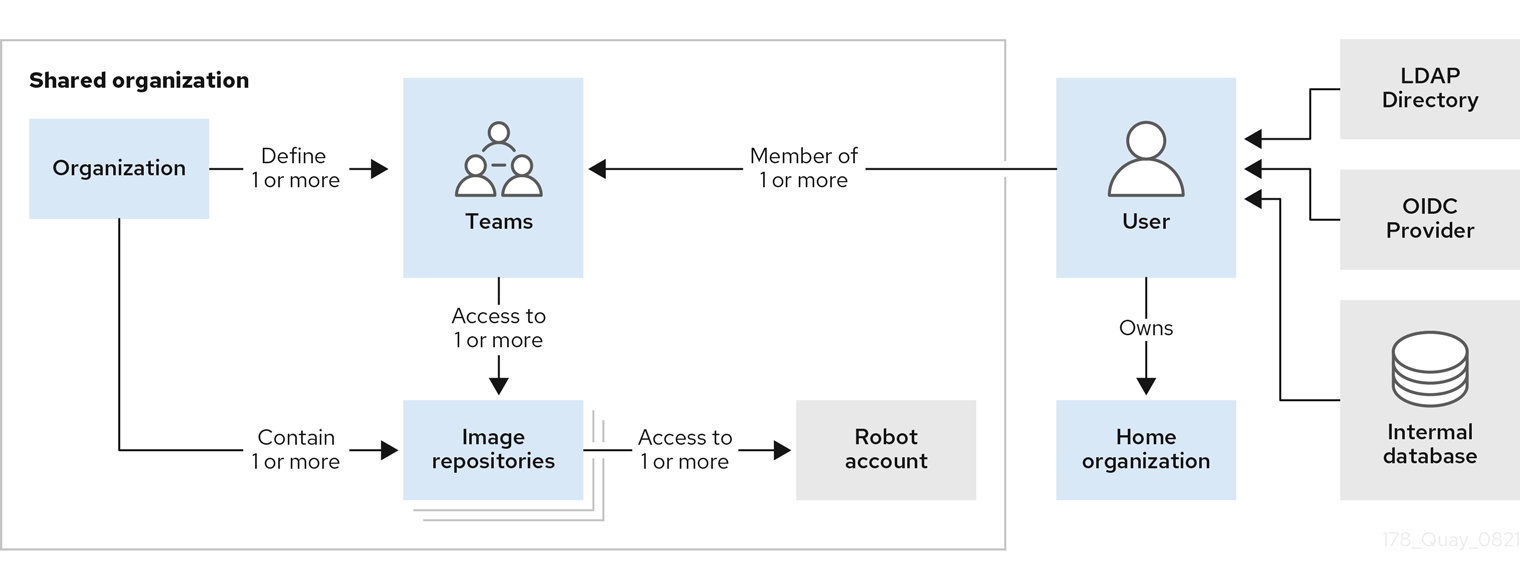
-
Organizations provide a way of sharing repositories under a common namespace that does not belong to a single user. Instead, these repositories belong to several users in a shared setting, such as a company.
-
Teams provide a way for an Organization to delegate permissions. Permissions can be set at the global level (for example, across all repositories), or on specific repositories. They can also be set for specific sets, or groups, of users.
-
Users can log in to a registry through the web UI or a by using a client like Podman and using their respective login commands, for example,
$ podman login. Each user automatically gets a user namespace, for example,<quay-server.example.com>/<user>/<username>, orquay.io/<username>if you are using Quay.io. -
Robot accounts provide automated access to repositories for non-human users like pipeline tools. Robot accounts are similar to OpenShift Container Platform Service Accounts. Permissions can be granted to a robot account in a repository by adding that account like you would another user or team.
User accounts overview
A user account is an authenticated identity on Project Quay that can create repositories, push and pull images, and manage access. You can create and delete users in the UI or by using the API.
Organizations overview
Organizations in Quay group users, repositories, and teams under a shared namespace for centralized access control. Administrators can assign roles and permissions to teams and users within an organization.
Other useful information about organizations includes the following:
-
You cannot have an organization embedded within another organization. To subdivide an organization, you use teams.
-
Organizations cannot contain users directly. You must first add a team, and then add one or more users to each team.
NoteIndividual users can be added to specific repositories inside of an organization. Consequently, those users are not members of any team on the Repository Settings page. The Collaborators View on the Teams and Memberships page shows users who have direct access to specific repositories within the organization without needing to be part of that organization specifically.
-
Teams can be set up in organizations as just members who use the repositories and associated images, or as administrators with special privileges for managing the Organization.
Project Quay repository overview
A repository provides a central location for storing a related set of container images that share a namespace in Quay. You can group repositories under namespaces for individual users, teams, or organizations.
For example, you might have a namespace for your personal projects, one for your company, or one for a specific team within your organization.
Project Quay Robot Account overview
A robot account provides automated, credential-based access to repositories in your registry, similar to OpenShift Container Platform service accounts. You can use robot accounts to grant container clients push and pull permissions without sharing personal credentials.
Setting up a Robot Account results in the following:
-
Credentials are generated for the Robot Account.
-
Repositories and images that the Robot Account can push and pull images from are identified.
-
Generated credentials can be copied and pasted to use with different container clients, such as Docker, Podman, Kubernetes, Mesos, and so on, to access each defined repository.
Each Robot Account is limited to a single user namespace or Organization. For example, the Robot Account could provide access to all repositories for the user quayadmin. However, it cannot provide access to repositories that are not in the user’s list of repositories.
Robot Accounts can be created using the Project Quay UI, or through the CLI using the Project Quay API. After creation, Project Quay administrators can leverage more advanced features with Robot Accounts, such as keyless authentication.
Project Quay teams overview
A team in Quay is a group of users that share permissions, which simplifies access control and collaboration across organizations and repositories. You can assign a team specific permissions so that its members have appropriate access based on their roles.
Understand the Red Hat Quay permissions model
Review Red Hat Quay permission levels and role-based access control to grant appropriate access without over-permissioning.
Project Quay permissions model
Project Quay provides a fine-grained permissions model that controls access to repositories and their content. Administrators can grant read, write, or admin access to users, robots, and teams to support secure collaboration and automation.
Project Quay administrators can grant users and robot accounts one of the following levels of access:
-
Read: Allows users, robots, and teams to pull images.
-
Write: Allows users, robots, and teams to push images.
-
Admin: Provides users, robots, and teams administrative privileges.
|
Note
|
Administrative users can delegate new permissions for existing users and teams, change existing permissions, and revoke permissions when necessary |
Collectively, these levels of access provide users or robot accounts the ability to perform specific tasks, like pulling images, pushing new versions of an image into the registry, or managing the settings of a repository. These permissions can be delegated across the entire organization and on specific repositories. For example, Read permissions can be set to a specific team within the organization, while Admin permissions can be given to all users across all repositories within the organization.
Understand Clair vulnerability scanning
Review Clair vulnerability scanning concepts and how scan results are produced to plan image security for your registry.
Clair security scanner
Clair is a vulnerability scanner that analyzes container image layers and reports security issues from upstream CVE databases in Project Quay. You can use these reports to identify vulnerabilities that affect image content.
About Clair
Clair scans container images for known vulnerabilities in Project Quay. You can use National Vulnerability Database (NVD) enrichment, including CVSS severity scores, to prioritize remediation.
The NVD is a United States government repository of security-related information, including known vulnerabilities and security issues in various software components and systems. NVD scores provide the following benefits:
-
Data synchronization. Clair can periodically synchronize its vulnerability database with the NVD. This ensures that it has the latest vulnerability data.
-
Matching and enrichment. Clair compares the metadata and identifiers of vulnerabilities it discovers in container images with the data from the NVD. This process involves matching the unique identifiers, such as Common Vulnerabilities and Exposures (CVE) IDs, to the entries in the NVD. When a match is found, Clair can enrich its vulnerability information with additional details from NVD, such as severity scores, descriptions, and references.
-
Severity scores. The NVD assigns severity scores to vulnerabilities, such as the Common Vulnerability Scoring System (CVSS) score, to indicate the potential impact and risk associated with each vulnerability. By incorporating NVD severity scores, Clair can provide more context on the seriousness of the vulnerabilities it detects.
If Clair finds vulnerabilities from NVD, a detailed and standardized assessment of the severity and potential impact of vulnerabilities detected within container images is reported to users on the UI. CVSS enrichment data provides the following benefits:
-
Vulnerability prioritization. By using CVSS scores, you can prioritize vulnerabilities based on their severity and address the most critical issues first.
-
Assess risk. CVSS scores can help you understand the potential risk a vulnerability poses to your containerized applications.
-
Communicate severity. CVSS scores provide a standardized way to communicate the severity of vulnerabilities across teams and organizations.
-
Inform remediation strategies. CVSS enrichment data can guide Quay.io users in developing appropriate remediation strategies.
-
Compliance and reporting. Integrating CVSS data into reports generated by Clair can help organizations demonstrate their commitment to addressing security vulnerabilities and complying with industry standards and regulations.
Clair concepts
Clair breaks container image analysis into indexing, matching, and notification. You can use these concepts to understand how Clair builds and updates vulnerability reports in Project Quay.
Indexing
Clair’s indexer service plays a crucial role in understanding the makeup of a container image. In Clair, container image representations are called "manifests." Manifests are used to comprehend the contents of the image’s layers. To streamline this process, Clair takes advantage of the fact that Open Container Initiative (OCI) manifests and layers are designed for content addressing, reducing repetitive tasks.
During indexing, a manifest that represents a container image is taken and broken down into its essential components. The indexer’s job is to uncover the image’s contained packages, its origin distribution, and the package repositories it relies on. This valuable information is then recorded and stored within Clair’s database. The insights gathered during indexing serve as the basis for generating a comprehensive vulnerability report. This report can be seamlessly transferred to a matcher node for further analysis and action, helping users make informed decisions about their container images' security.
Matching
With Clair, a matcher node is responsible for matching vulnerabilities to a provided index report.
Matchers are responsible for keeping the database of vulnerabilities up to date. Matchers run a set of updaters, which periodically probe their data sources for new content. New vulnerabilities are stored in the database when they are discovered.
The matcher API is designed to always provide the most recent vulnerability report when queried. The vulnerability report summarizes both a manifest’s content and any vulnerabilities affecting the content.
Notifier service
Clair uses a notifier service that keeps track of new security database updates and informs users if new or removed vulnerabilities affect an indexed manifest.
When the notifier becomes aware of new vulnerabilities affecting a previously indexed manifest, it uses the configured methods in your config.yaml file to issue notifications about the new changes. Returned notifications express the most severe vulnerability discovered because of the change. This avoids creating excessive notifications for the same security database update.
When a user receives a notification, it issues a new request against the matcher to receive an up-to-date vulnerability report.
You can subscribe to notifications through the following mechanics:
-
Webhook delivery
-
AMQP delivery
-
STOMP delivery
Configuring the notifier is done through the Clair YAML configuration file.
|
Note
|
By default, the notifier service on Quay.io is disabled. As a result, repository owners cannot configure notifications when new CVEs are reported. However, when CVE databases are updated, which is every 6 hours on Quay.io, new vulnerabilities affecting previously indexed manifests are automatically updated. As a result, manual re-scans are not required, and users can view new CVEs directly on Quay.io. |
Understand the Quay Bridge Operator
Review Quay Bridge Operator features to decide whether to integrate OpenShift cluster builds with your Red Hat Quay registry.
Quay Bridge Operator features
The Quay Bridge Operator duplicates integrated OpenShift Container Platform registry features in Project Quay and synchronizes namespaces, image streams, and robot accounts between your clusters.
The features enabled with the Quay Bridge Operator include:
-
Synchronizing OpenShift Container Platform namespaces as Project Quay organizations.
-
Creating robot accounts for each default namespace service account.
-
Creating secrets for each created robot account, and associating each robot secret to a service account as
MountableandImage Pull Secret. -
Synchronizing OpenShift Container Platform image streams as Project Quay repositories.
-
Automatically rewriting new builds making use of image streams to output to Project Quay.
-
Automatically importing an image stream tag after a build completes.