Plan supporting infrastructure for Red Hat Quay
Before you deploy Red Hat Quay, review supported options for image storage, database, and Redis backends.
Image storage backend
Image storage for Project Quay holds all binary blobs and can be local, highly available, or geo-replicated. You can use local storage for proof of concept or choose supported object storage such as Ceph, Red Hat OpenShift Data Foundation, or cloud providers for production.
- Local storage
-
Project Quay can work with local storage, however this should only be used for proof of concept or test setups, as the durability of the binary blobs cannot be guaranteed. Mounted NFS volumes are not supported. Local storage is meant for Project Quay test-only installations.
- HA storage setup
-
For a Project Quay HA deployment, you must provide HA image storage, for example Red Hat OpenShift Data Foundation or Ceph Object Gateway (also called RADOS Gateway). Detailed instructions on how to use Ceph storage as a highly available storage backend can be found in the Quay High Availability Guide. Further information about Red Hat Ceph Storage and HA setups can be found in the Red Hat Ceph Storage Architecture Guide.
- Geo-replication
-
Local storage cannot be used for geo-replication. Geo-replication requires object storage in each region, and object storage must be geographically accessible by all other regions.
Supported image storage engines
Project Quay supports the following on premise storage types:
-
Ceph/Rados RGW
-
OpenStack Swift
-
Red Hat OpenShift Data Foundation 4 (through NooBaa)
Project Quay supports the following public cloud storage engines:
-
Amazon Web Services (AWS) S3
-
Google Cloud Storage
-
Azure Blob Storage
-
Hitachi Content Platform (HCP)
Database backend
The Project Quay database backend stores registry metadata such as users, organizations, images, and tags. PostgreSQL is the preferred database for Project Quay and Clair.
Support for MySQL and MariaDB as the database backend is deprecated since the Project Quay 3.6 release and is planned for removal. Until then, MySQL remains supported according to the support matrix, but does not receive additional features or explicit testing coverage. The Project Quay Operator supports only PostgreSQL deployments when the database is managed. If you want to use MySQL, you must deploy it manually and set the database component to managed: false.
Deploying Project Quay in a highly available (HA) configuration requires that your database services are provisioned for high availability. If Project Quay is running on public cloud infrastructure, use the PostgreSQL services that your cloud provider offers; MySQL is also supported. PostgreSQL includes the features needed to support Clair security scanning; MySQL can run the registry database but does not provide the Clair features that PostgreSQL does.
When you use Clair vulnerability scanning, plan a separate PostgreSQL database for Clair. Do not use the same PostgreSQL database for both Project Quay and Clair. The Operator can manage a Clair database (clairpostgres), or you can provision Clair’s database yourself.
Geo-replication requires a single, shared database that is accessible from all regions.
Redis backend
Project Quay uses Redis to support backend tasks such as live builder logs, user events, and the locking mechanism that is required for garbage collection. Redis data is ephemeral.
You do not need high availability for Redis because the data is not persistent. If Redis fails, you will lose access to build logs, builders, and the garbage collector service. Additionally, user events will be unavailable.
For geo-replication, a single Redis cache is shared across the entire Project Quay setup and must be accessible by all Project Quay pods.
You can use a Redis image from the Red Hat Software Collections or from any other source you prefer.
Choose a single registry or multiple registries
Compare running one shared Red Hat Quay registry with deploying multiple distinct registries to balance cost, isolation, and operational complexity.
Choosing a single registry or multiple registries
A single shared Project Quay registry can serve many clusters and data centers with organizations, RBAC, and geo-replication. You can avoid multiple distinct registries and reduce storage, infrastructure, and operational costs in most scenarios.
Many users consider running multiple, distinct registries. The preferred approach with Project Quay is to have a single, shared registry:
-
If you want a clear separation between development and production images, or a clear separation by content origin, for example, keeping third-party images distinct from internal ones, you can use organizations and repositories, combined with role-based access control (RBAC), to achieve the desired separation.
-
Given that the image registry is a critical component in an enterprise environment, you may be tempted to use distinct deployments to test upgrades of the registry software to newer versions. The Project Quay Operator updates the registry for patch releases as well as minor or major updates. This means that any complicated procedures are automated and, as a result, you do not need to provision multiple instances of the registry to test the upgrade.
-
With Project Quay, you do not need a separate registry for each cluster you deploy. Project Quay is proven to work at scale at Quay.io, and can serve content to thousands of clusters.
-
Even if you have deployments in multiple data centers, you can still use a single Project Quay instance to serve content to multiple physically-close data centers, or use the HA functionality with load balancers to stretch across data centers. Alternatively, you can use the Project Quay geo-replication feature to stretch across physically distant data centers. This requires the provisioning of a global load balancer or DNS-based geo-aware load balancing.
-
One scenario where it may be appropriate to run multiple distinct registries, is when you want to specify different configuration for each registry.
In summary, running a shared registry helps you to save storage, infrastructure and operational costs, but a dedicated registry might be needed in specific circumstances.
Size and subscribe to Red Hat Quay
Review sample deployment sizes, minimum requirements, and subscription options to budget and right-size your Red Hat Quay deployment.
Scalability and minimum requirements
Project Quay scales from proof of concept to large deployments such as Quay.io. You can use sample sizing tables and subscription guidance to plan capacity for your environment.
Scalability of Project Quay is one of its key strengths, with a single code base supporting a broad spectrum of deployment sizes, including the following:
-
Proof of Concept deployment on a single development machine
-
Mid-size deployment of approximately 2,000 users that can serve content to dozens of Kubernetes clusters
-
High-end deployment such as Quay.io that can serve thousands of Kubernetes clusters world-wide
Sizing depends on many factors, such as the number of users, images, concurrent pulls and pushes, so standard sizing recommendations are not available.
The following are the minimum requirements for systems running Project Quay (per container/pod instance):
-
Quay: minimum 6 GB; recommended 8 GB, 2 or more vCPUs
-
Clair: recommended 2 GB RAM and 2 or more vCPUs
-
Storage: recommended 30 GB
-
NooBaa: minimum 2 GB, 1 vCPU (when you select the
objectstoragecomponent in the Operator) -
Clair database: minimum 5 GB required for security metadata
Stateless components of Project Quay can be scaled out, but scaling increases load on stateful backend services.
Sample deployment sizes
Sample Project Quay sizing tables list approximate resources for proof of concept, mid-size, and high-end deployments. You can use these figures as a starting point and adjust based on your workload.
The following table shows approximate sizing for Proof of Concept, mid-size, and high-end deployments. Whether a deployment runs appropriately with the same metrics depends on many factors not shown below.
| Metric | Proof of concept | Mid-size | High End (Quay.io) |
|---|---|---|---|
No. of Quay containers by default |
1 |
4 |
15 |
No. of Quay containers max at scale-out |
N/A |
8 |
30 |
No. of Clair containers by default |
1 |
3 |
10 |
No. of Clair containers max at scale-out |
N/A |
6 |
15 |
No. of mirroring pods (to mirror 100 repositories) |
1 |
5-10 |
N/A |
Database sizing |
2-4 Cores; 6-8 GB RAM; 10-20 GB disk |
4-8 Cores; 6-32 GB RAM; 100 GB - 1 TB disk |
32 cores; 244 GB; 1+ TB disk |
Object storage backend sizing |
10-100 GB |
1 - 20 TB |
50+ TB up to PB |
Redis cache sizing |
2 Cores; 2-4 GB RAM |
4 cores; 28 GB RAM |
|
Underlying node sizing (physical or virtual) |
4 Cores; 8 GB RAM |
4-6 Cores; 12-16 GB RAM |
Quay: 13 cores; 56 GB RAM. Clair: 2 cores; 4 GB RAM |
Redis cache sizing applies only when you use Quay builders; otherwise Redis sizing is not significant.
Subscription options
Project Quay subscriptions are based on deployments and include Standard or Premium support. You can review subscription models and entitlements when planning your registry deployment.
|
Note
|
Deployment means an installation of a single Project Quay registry using a shared data backend. |
With a Project Quay subscription, the following options are available:
-
You can deploy any number of pods, such as Quay, Clair, Builder, and so on.
-
Project Quay pods can run in multiple data centers or availability zones.
-
Storage and database backends can be deployed across multiple data centers or availability zones, but only as a single, shared storage backend and single, shared database backend.
-
Project Quay can manage content for an unlimited number of clusters or standalone servers.
-
Clients can access the Project Quay deployment regardless of their physical location.
-
You can deploy Project Quay on OpenShift Container Platform infrastructure nodes to minimize subscription requirements.
-
You can run the Container Security Operator (CSO) and the Quay Bridge Operator (QBO) on your OpenShift Container Platform clusters at no additional cost.
|
Note
|
Project Quay geo-replication requires a subscription for each storage replication. The database, however, is shared. |
Plan a deployment topology
Compare example proof of concept, high availability, and Operator deployment topologies, including storage proxy layouts, to choose a model that fits your environment.
Example deployment topologies
Project Quay deployment examples include standalone proof of concept, highly available multi-host, and OpenShift Container Platform with the Project Quay Operator. You can reference these examples when planning your registry topology.
The following image shows examples for on premise configuration, for the following types of deployments:
-
Standalone Proof of Concept
-
Highly available deployment on multiple hosts
-
Deployment on an OpenShift Container Platform cluster by using the Project Quay Operator
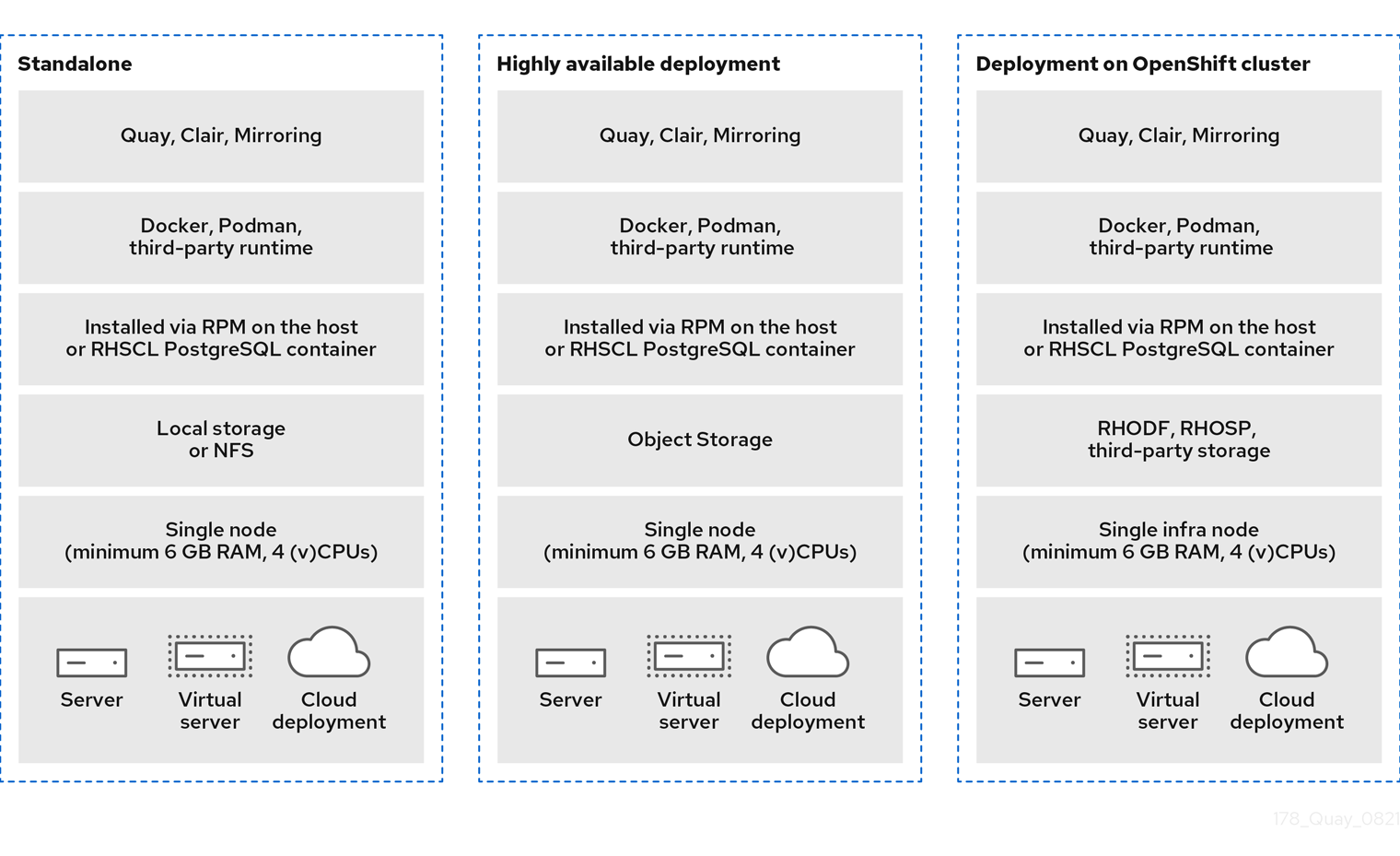
Project Quay example deployments
Example Project Quay deployments include proof of concept on a single node, highly available in a single data center, and highly available across multiple data centers. You can reference these examples when planning your deployment.
The following image shows three possible deployments for Project Quay:
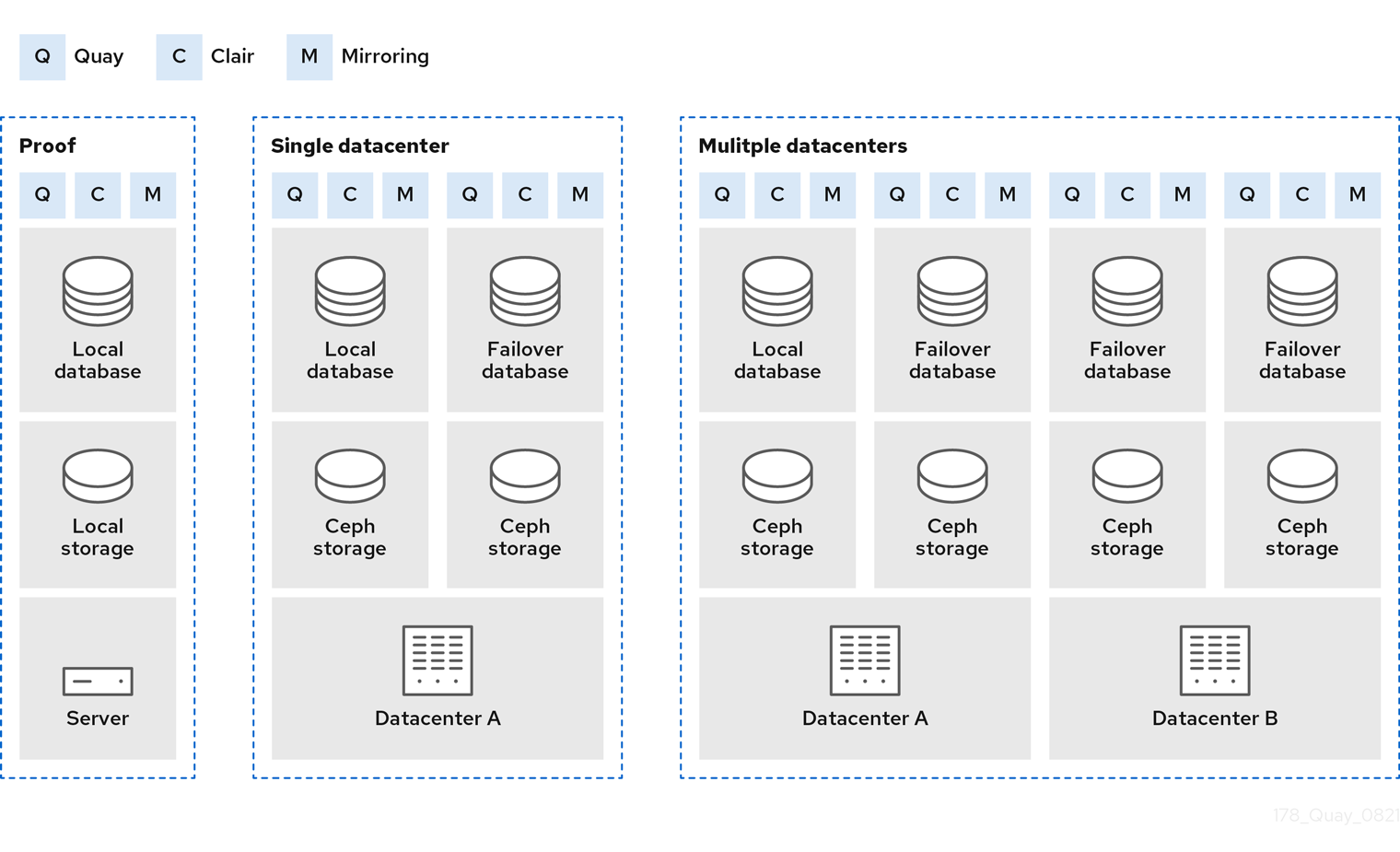
- Proof of Concept
-
Running Project Quay, Clair, and mirroring on a single node, with local image storage and local database
- Single data center
-
Running highly available Project Quay, Clair ,and mirroring, on multiple nodes, with HA database and image storage
- Multiple data centers
-
Running highly available Project Quay, Clair, and mirroring, on multiple nodes in multiple data centers, with HA database and image storage
Project Quay deployment topology
Project Quay deployment topology sends pushes, UI, and API traffic to public endpoints and serves pulls from object storage. You can use this overview to understand traffic flow in your deployment.
The following image provides a high level overview of a Project Quay deployment topology:
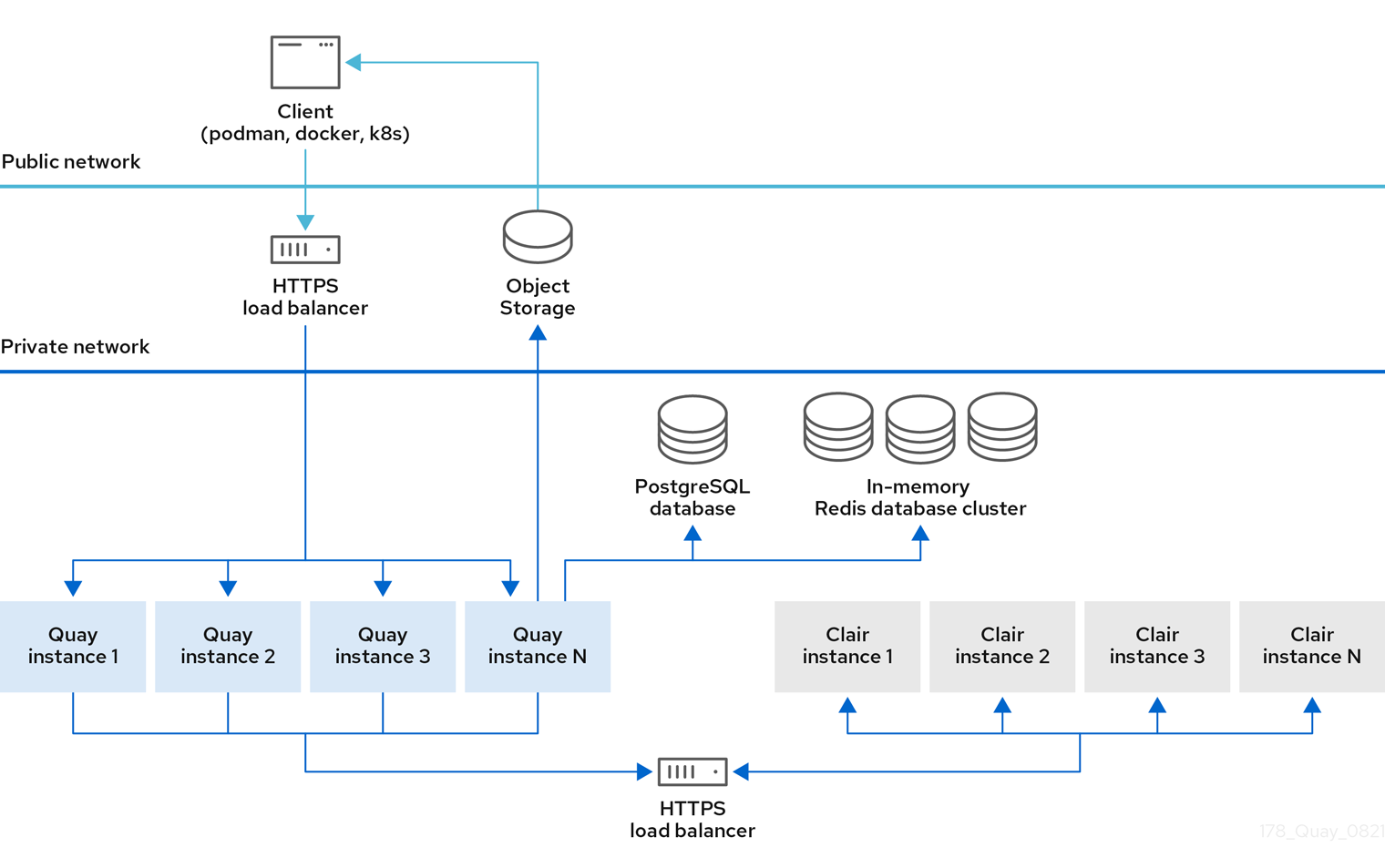
In this deployment, all pushes, user interface, and API requests are received by public Project Quay endpoints. Pulls are served directly from object storage.
Project Quay deployment topology with storage proxy
Project Quay deployment topology with storage proxy routes all traffic, including pulls, through the public endpoint. You can use this topology when clients cannot access object storage directly or when you need a single entry point.
The following image provides a high level overview of a Project Quay deployment topology with storage proxy configured:
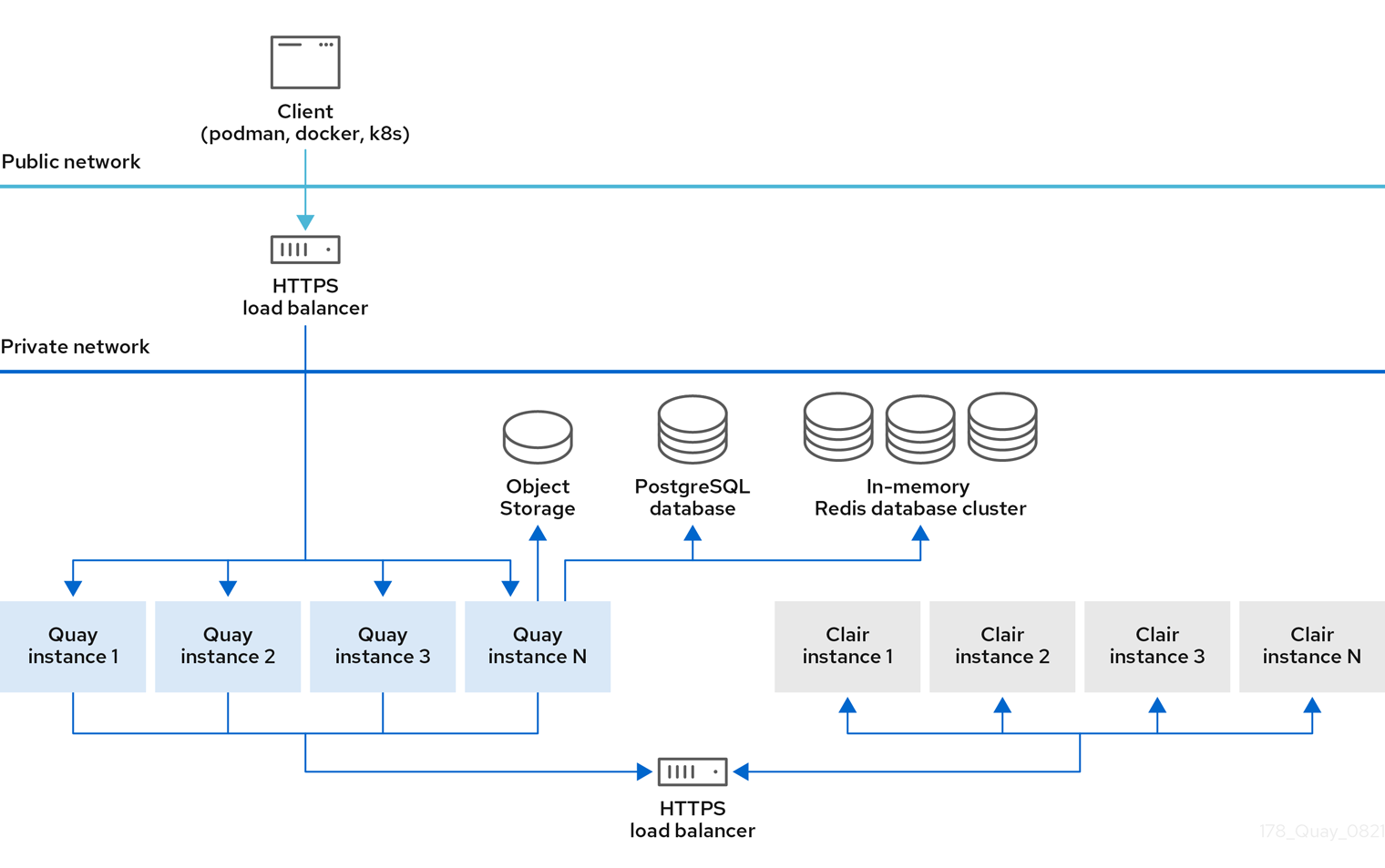
With storage proxy configured, all traffic passes through the public Project Quay endpoint.
Choose a Quay.io plan
Compare Quay.io plan tiers and features to select the hosted registry option that fits your organization.
Quay.io plan tiers
Quay.io offers a free tier and paid plans with additional capacity and features. You can use this overview to compare hosted options when you evaluate Quay.io against a self-managed Project Quay deployment.
In addition to a free tier, Quay.io offers several paid plans with enhanced benefits. Plan names, limits, and prices are listed on the Quay.io Pricing page.
All Quay.io plans include the following benefits:
-
Continuous integration
-
Public repositories
-
Robot accounts
-
Teams
-
SSL/TLS encryption
-
Logging and auditing
-
Invoice history
Quay.io subscriptions are handled by the Stripe payment processing platform. A valid credit card is required to subscribe to a paid plan.
Signing up for a Quay.io plan
To subscribe to a paid Quay.io plan, you can select a tier on the Pricing page and complete checkout with Stripe. A valid credit card is required.
-
Navigate to the Quay.io Pricing page.
-
Decide on a plan, for example, Small, and click Buy Now. You are redirected to the Create New Organization page. Enter the following information:
-
Organization Name
-
Organization Email
-
Optional. You can select a different plan if you want a plan larger than, for example, Small.
-
-
Resolve the captcha, and select Create Organization.
-
You are redirected to Stripe. Enter the following information:
-
Card information, including MM/YY and the CVC
-
Name on card
-
Country or region
-
ZIP (if applicable)
-
Check the box if you want your information to be saved.
-
Phone Number
-
-
Click Subscribe after all boxes have been filled.
Reviewing Quay.io billing information
The Billing information section on the Quay.io User Settings page shows your current plan, invoices, and receipt options. You can review plan details and manage how receipts are sent.
The following information is available:
-
Current Plan. This section denotes the current plan Quay.io plan that you are signed up for. It also shows the amount of private repositories you have.
-
Invoices. If you are on a paid plan, you can click View Invoices to view a list of invoices.
-
Receipts. If you are on a paid plan, you can select whether to have receipts for payment emailed to you, another user, or to opt out of receipts altogether.
Plan a Project Quay proof of concept deployment
Before you install a proof of concept deployment, review host, RHEL subscription, and resource requirements for Red Hat Quay.
Project Quay proof of concept host requirements
Before you deploy a proof of concept Project Quay registry, ensure your host meets minimum hardware requirements and you have Red Hat Enterprise Linux (RHEL) 9 with an active subscription. You also need Podman for running containers in this guide.
-
Two or more virtual CPUs
-
4 GB or more of RAM
-
Approximately 30 GB of disk space on your test system, which can be broken down as follows:
-
Approximately 10 GB of disk space for the Red Hat Enterprise Linux (RHEL) operating system.
-
Approximately 10 GB of disk space for Docker storage for running three containers.
-
Approximately 10 GB of disk space for Project Quay local storage.
NoteCEPH or other local storage might require more memory.
See the Quay 3.x sizing guidelines for more information on sizing.
-
-
The following architectures are supported for Project Quay:
-
amd64/x86_64
-
s390x
-
ppc64le
-
Plan a Project Quay deployment on OpenShift Container Platform
Before you deploy Red Hat Quay on OpenShift Container Platform, review what the Operator manages, how configuration works, external registry integration options, and OpenShift Container Platform cluster and object storage requirements.
What the Project Quay Operator manages
The Project Quay Operator simplifies installation, deployment, and management of the Project Quay container registry on OpenShift Container Platform. You can use the Operator to treat Quay as a native OpenShift Container Platform application and manage its full lifecycle.
The Operator can manage Quay components for you, or you can provide external dependencies such as the database and object storage when you need more control. Planning an Operator deployment means deciding which components stay managed and which you supply yourself.
How Operator configuration works
When deploying Red Hat Quay on OpenShift Container Platform, the registry configuration is managed declaratively through two primary mechanisms: the QuayRegistry custom resource (CR) and the configBundleSecret resource. You use these mechanisms to configure and manage your registry deployment.
Understanding the QuayRegistry CR
The QuayRegistry CR is used to determine whether a component is managed, or automatically handled by the Operator, or unmanaged, or provided externally by the user.
By default, the QuayRegistry CR contains the following key fields:
-
configBundleSecret: The name of a Kubernetes Secret containing theconfig.yamlfile which defines additional configuration parameters. -
name: The name of your Project Quay registry. -
namespace: The namespace, or project, in which the registry was created. -
spec.components: A list of components that the Operator automatically manages. Each component entry includes the following fields:-
kind: The name of the component -
managed: A boolean that addresses whether the component lifecycle is handled by the Project Quay Operator. Settingmanaged: trueto a component in theQuayRegistryCR means that the Operator manages the component. -
secretRef: Optional. For thetlscomponent only, references an externalkubernetes.io/tlsSecret whenmanagedisfalse. For more information, see Referencing an external TLS Secret for Red Hat Quay on OpenShift Container Platform.
-
All QuayRegistry components are automatically managed and auto-filled upon reconciliation for visibility unless specified otherwise. The following sections highlight the major QuayRegistry components and provide an example YAML file that shows the default settings.
Managed components
Managed components are Project Quay registry components that the Operator automatically configures and installs. By using managed components, you simplify deployment and reduce manual configuration tasks.
| Field | Type | Description |
|---|---|---|
|
Boolean |
Holds overrides for deployment of Red Hat Quay on OpenShift Container Platform, such as environment variables and number of replicas. This component cannot be set to unmanaged ( |
|
Boolean |
Used for storing registry metadata. Currently, PostgreSQL version 13 is used. |
|
Boolean |
Provides image vulnerability scanning. You can override ephemeral scratch storage for image layer extraction by using |
|
Boolean |
Stores live builder logs and the locking mechanism that is required for garbage collection. You can override CPU and memory resources for this component when it is managed. |
|
Boolean |
Adjusts the number of |
|
Boolean |
Stores image layer blobs. When set to |
|
Boolean |
Provides an external entrypoint to the Project Quay registry from outside of OpenShift Container Platform. |
|
Boolean |
Configures repository mirror workers to support optional repository mirroring. |
|
Boolean |
Features include a Grafana dashboard, access to individual metrics, and notifications for frequently restarting |
|
Boolean |
Configures whether SSL/TLS is automatically handled. When |
|
Boolean |
Configures a managed Clair database. This is a separate database than the PostgreSQL database that is used to deploy Project Quay. |
The following example shows you the default configuration for the QuayRegistry custom resource provided by the Project Quay Operator. It is available on the OpenShift Container Platform web console.
apiVersion: quay.redhat.com/v1
kind: QuayRegistry
metadata:
  name: <example_registry>
  namespace: <namespace>
  spec:
    configBundleSecret: config-bundle-secret
    components:
    - kind: quay
      managed: true
    - kind: postgres
      managed: true
    - kind: clair
      managed: true
    - kind: redis
      managed: true
    - kind: horizontalpodautoscaler
      managed: true
    - kind: objectstorage
      managed: true
    - kind: route
      managed: true
    - kind: mirror
      managed: true
    - kind: monitoring
      managed: true
    - kind: tls
      managed: true
    - kind: clairpostgres
      managed: true
Using unmanaged components for dependencies
Unmanaged components are Project Quay dependencies such as PostgreSQL, Redis, or object storage that you deploy and maintain outside of the Operator’s control. You use unmanaged components to integrate existing infrastructure or meet specific configuration requirements.
|
Note
|
If you are using an unmanaged PostgreSQL database, and the version is PostgreSQL 10, it is highly recommended that you upgrade to PostgreSQL 13. PostgreSQL 10 had its final release on November 10, 2022 and is no longer supported. For more information, see the PostgreSQL Versioning Policy. |
For more information about configuring unmanaged components, see "Configure Red Hat Quay database and Redis backends", "Object storage backend configuration fields", "Configure networking for Red Hat Quay", and "Tune Operator autoscaling and component resources".
Project Quay as an external registry for OpenShift Container Platform
You can run Project Quay as an external registry in front of multiple OpenShift Container Platform clusters that use internal registries, or rely on cluster-internal registries alone. You can choose the approach that fits your image governance and distribution needs.
The required coordination of Secrets and ImageStreams is automated by the Quay Bridge Operator, which can be launched from the OperatorHub for OpenShift Container Platform.
OpenShift Container Platform cluster
To deploy and manage the Project Quay Operator, you need an OpenShift Container Platform cluster running version 4.5 or later and an administrative account with sufficient permissions to perform cluster-scoped actions.
Cluster resource requirements
The Project Quay Operator requires dedicated compute resources for each application pod. Ensure that your OpenShift Container Platform cluster meets the following minimum requirements for sufficient capacity.
| Resource type | Requirement |
|---|---|
Memory |
8 Gi |
CPU |
2000 millicores (2 vCPUs) |
The Operator creates at least one main application pod per Project Quay deployment that it manages. Plan your cluster capacity accordingly.
Object Storage
Project Quay requires object storage to store all container image layer blobs. You can provide this storage through managed storage that the Operator configures automatically, or through unmanaged storage using an existing external service.
Choosing managed object storage
If you want the Operator to manage object storage for Project Quay, your cluster needs to be capable of providing it through the ObjectBucketClaim API. There are multiple implementations of this API available, for instance, NooBaa in combination with Kubernetes PersistentVolumes or scalable storage backends like Ceph. Refer to Additional resources for more details on how to deploy this component.
Choosing unmanaged object storage
Unmanaged storage is Project Quay object storage that you provide and manage externally, such as AWS S3, Google Cloud Storage, or self-hosted S3-compatible services. You use unmanaged storage when you need to connect to a specific storage provider that you manage yourself.
Project Quay supports the following major cloud and on-premises object storage providers:
-
Amazon Web Services (AWS) S3
-
AWS STS S3 (Security Token Service)
-
AWS CloudFront (CloudFront S3Storage)
-
Google Cloud Storage
-
Microsoft Azure Blob Storage
-
Swift Storage
-
Nutanix Object Storage
-
IBM Cloud Object Storage
-
NetApp ONTAP S3 Object Storage
-
Hitachi Content Platform (HCP) Object Storage
For a complete list of object storage providers, the Quay Enterprise 3.x support matrix.
For example configurations of external object storage, see Storage object configuration fields, which provides the required YAML configuration examples, credential formatting, and full field descriptions for all supported external storage providers.
StorageClass
The Project Quay Operator uses the default StorageClass in your cluster to provision persistent storage for the Quay and Clair PostgreSQL databases.
Ensure that your cluster has a default StorageClass configured before installation so that the Operator can create the required Persistent Volume Claims.
|
Important
|
Before proceeding with the installation, verify that a default |
Plan a Project Quay high availability deployment
Before you install a highly available registry, review shared infrastructure requirements and host capacity for Red Hat Quay HA deployments.
High availability infrastructure requirements
High availability Project Quay deployments need a shared database, highly available object storage, a load balancer, and multiple registry hosts. You can use these requirements to design a resilient topology before you install.
|
Important
|
The Project Quay configuration tool is unsupported for standalone high availability deployments. Create and maintain the |
Plan for the following supporting infrastructure:
- Database
-
Use PostgreSQL for production HA deployments when you need Clair vulnerability scanning. You can use an existing HA database that meets the Project Quay support policy, or a supported PostgreSQL Operator offering from a vendor such as Crunchy Data when you have a support relationship with that vendor. MySQL can run the registry database but does not provide the Clair features that PostgreSQL does.
- Object storage
-
Provide highly available object storage for image blobs. Local storage is not suitable for HA or geo-replication. Supported options include Ceph Object Gateway (RADOS Gateway), Amazon S3, Azure Blob Storage, Google Cloud Storage, OpenStack Swift, CloudFront with S3, and NooBaa S3 storage.
- Load balancer
-
Place a load balancer in front of the Project Quay application nodes. HAProxy is a common example; you can use any proxy that fits your environment.
- Registry and Redis hosts
-
Run Project Quay and Redis on multiple systems so that you can lose a node without losing the registry service. A typical planning model uses three or more hosts for Quay and Redis, separate capacity for the database and load balancer tier, and a dedicated HA storage cluster or cloud object storage.
Project Quay high availability host capacity
To plan host capacity for a high availability Project Quay deployment, you can start from per-role CPU, memory, and disk guidance and adjust for your workload.
Use the following starting points per system (physical or virtual). Increase capacity for production traffic, Clair, builders, and storage growth.
- Load balancer and database hosts
-
-
2 or more vCPUs
-
4 GB RAM
-
About 20 GB disk (operating system plus container storage)
-
- Project Quay and Redis hosts
-
-
2 or more vCPUs
-
4 GB RAM
-
About 20 GB disk (operating system plus container storage)
-
- Object storage hosts (when you run Ceph or similar on premise)
-
-
2 or more vCPUs
-
8 GB RAM
-
At least 30 GB disk, and more based on the image storage that you need
-
For broader sample sizes across proof of concept, mid-size, and high-end deployments, see the sizing guidance earlier in this Plan guide.
Plan a Project Quay public cloud deployment
Review AWS and Azure services used in public cloud Red Hat Quay deployments to align your architecture with your cloud strategy.
Amazon Web Services services for Project Quay
When you run Project Quay on Amazon Web Services, you can use AWS Elastic Load Balancer, S3 storage, RDS, and ElastiCache Redis for backend services. You can reference the overview and EC2 instance recommendations when planning your AWS deployment.
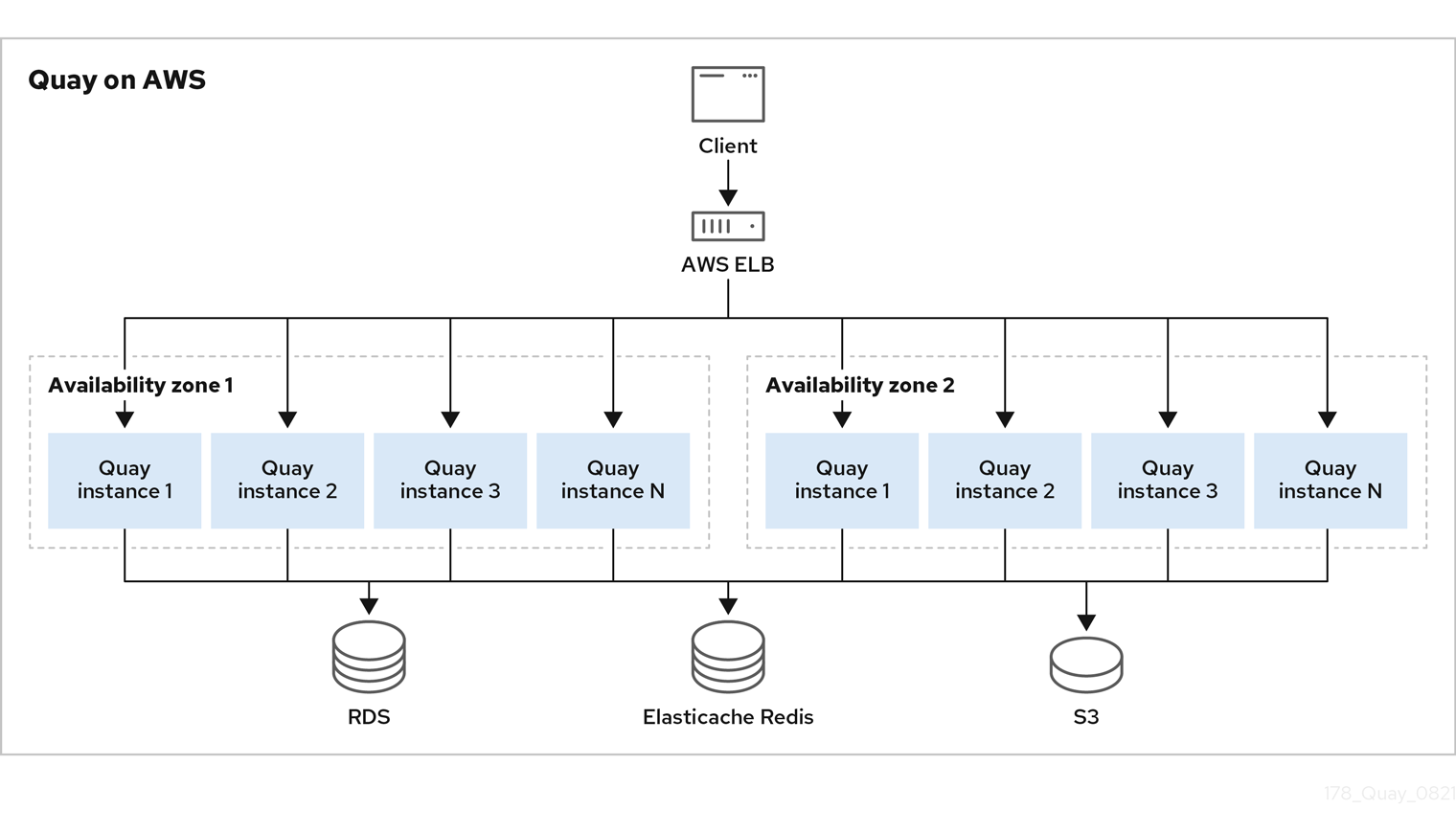
If Project Quay is running on Amazon Web Services (AWS), you can use the following features:
-
AWS Elastic Load Balancer
-
AWS S3 (hot) blob storage
-
AWS RDS database
-
AWS ElastiCache Redis
-
EC2 virtual machine recommendation: M3.Large or M4.XLarge
The following image provides a high level overview of Project Quay running on AWS:
Microsoft Azure services for Project Quay
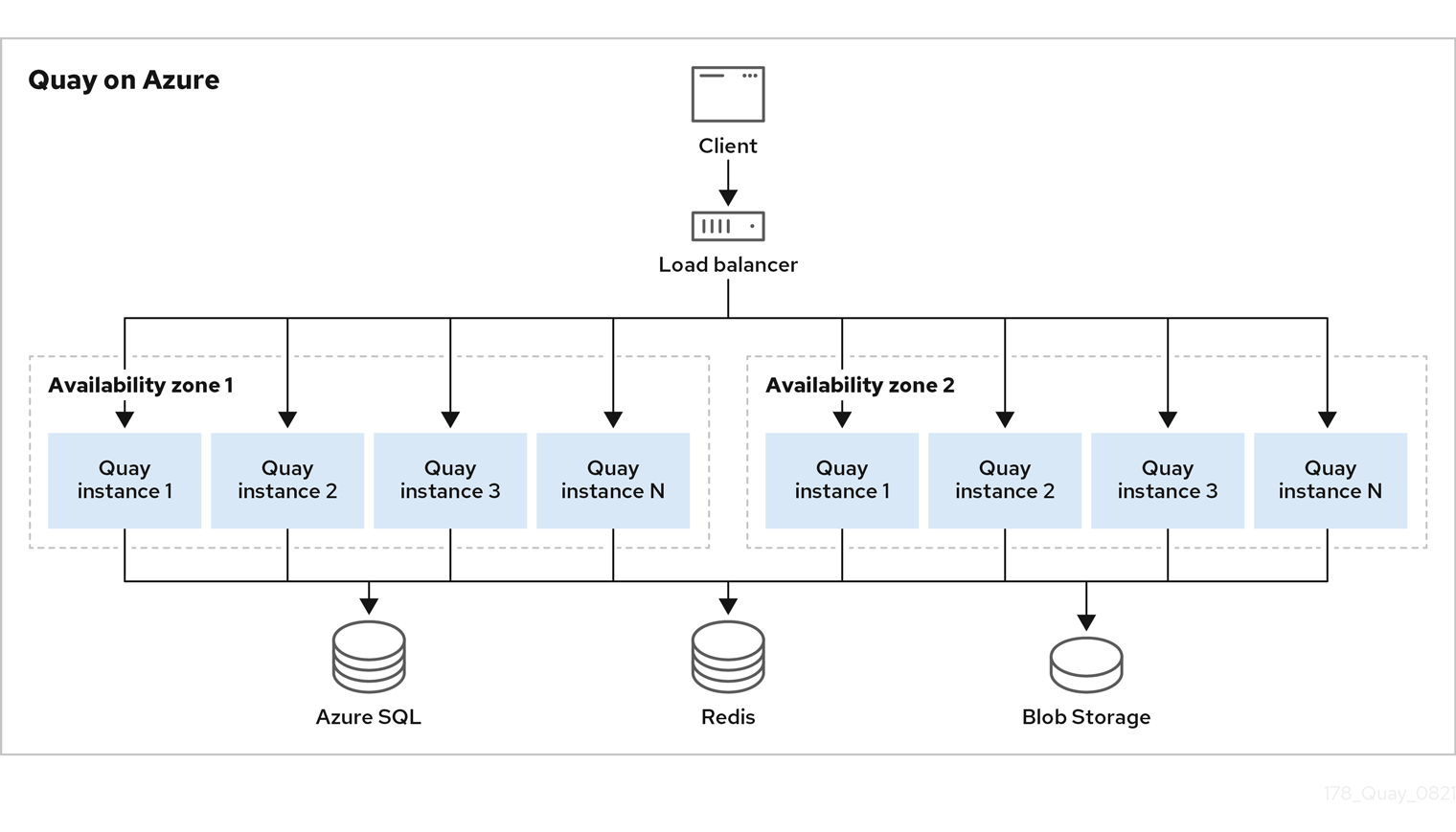
When you run Project Quay on Microsoft Azure, you can use Azure managed PostgreSQL, Blob Storage (hot), and Azure Cache for Redis for backend services. You can reference the overview when planning your Azure deployment.
The following image provides a high level overview of Project Quay running on Microsoft Azure:
Plan content distribution and geo-replication
Compare repository mirroring, geo-replication, and air-gapped distribution options, including architecture and capacity tradeoffs for standalone and Operator deployments.
Repository mirroring
With repository mirroring in Project Quay, you can copy images from an external registry into your cluster. You sync by repository or organization name and tag, set intervals, and filter architectures.
From a Project Quay registry with mirroring enabled, you can:
-
Choose a repository or organization from an external registry to mirror
-
Add credentials to access the external registry
-
Identify specific container image repository or organization names and tags to sync
-
Set intervals at which a repository or organization is synced
-
Check the current state of synchronization
-
Filter the architectures that are mirrored
Repository mirroring suits distinct registries that must share selected upstream content. You can configure mirroring in the Project Quay configuration file or by using the Project Quay API when you are ready to implement it.
Repository mirroring capacity considerations
For Project Quay repository mirroring, you can run mirroring workers on any node and size the number of workers to how many repositories you want to sync in parallel.
When you plan mirroring capacity, consider the following:
-
Mirroring workers can run on nodes that already run Project Quay.
-
Mirroring runs in scheduled batches. More workers allow more repositories to sync at the same time. For example, 10 workers can run 10 mirroring operations in parallel.
-
Size workers based on how many repositories you need to mirror in parallel, how many images and tags those repositories contain, and how often content changes.
-
Multiple tags in the same repository cannot be mirrored in parallel.
Geo-replication
Geo-replication connects multiple geographically distributed Project Quay deployments so that clients use them as a single registry. Standalone and Operator-based deployments support geo-replication.
With geo-replication, regions share one database and one Redis instance while each region keeps local object storage. Clients push and pull through a common entrypoint, typically a global load balancer, and blob data replicates asynchronously between storage backends.
Geo-replication features
With geo-replication in Project Quay, image pushes go to the nearest storage backend and data replicates in the background so that pulls can use the closest available engine.
The following are the key features of geo-replication:
-
When geo-replication is configured, container image pushes are written to the preferred storage engine for that Project Quay instance. This is typically the nearest storage backend within the region.
-
After the initial push, image data is replicated in the background to other storage engines.
-
The list of replication locations is configurable and those can be different storage backends.
-
An image pull always uses the closest available storage engine to maximize pull performance.
-
If replication has not been completed yet, the pull uses the source storage backend instead.
Mirroring compared to geo-replication
Mirroring and geo-replication solve different distribution needs in Project Quay. Mirroring syncs selected repositories between separate registries; geo-replication shares one database and replicates blob storage across regions.
For example, a geo-replicated Project Quay registry can use two different blob storage endpoints.
The primary use cases for geo-replication include the following:
-
Speeding up access to the binary blobs for geographically dispersed setups
-
Guaranteeing that the image content is the same across regions
Mirroring synchronizes selected repositories, or subsets of repositories, from one registry to another. The registries are distinct, with each registry having a separate database and separate image storage.
The primary use cases for mirroring include the following:
-
Independent registry deployments in different data centers or regions, where a certain subset of the overall content is supposed to be shared across the data centers and regions
-
Automatic synchronization or mirroring of selected (allowlisted) upstream repositories from external registries into a local Project Quay deployment
|
Note
|
Mirroring and geo-replication can be used simultaneously. |
| Feature / Capability | Geo-replication | Mirroring |
|---|---|---|
What is the feature designed to do? |
A shared, global registry |
Distinct, different registries |
What happens if replication or mirroring has not been completed yet? |
The remote copy is used (slower) |
No image is served |
Is access to all storage backends in both regions required? |
Yes (all Project Quay nodes) |
No (distinct storage) |
Can users push images from both sites to the same repository or organization? |
Yes |
No |
Is all registry content and configuration identical across all regions (shared database)? |
Yes |
No |
Can users select individual namespaces or repositories to be mirrored? |
No |
Yes |
Can users apply filters to synchronization rules? |
No |
Yes |
Are individual / different role-based access control configurations allowed in each region |
No |
Yes |
Geo-replication requirements and constraints
Project Quay geo-replication requires shared storage, database, Redis, network access between regions, and a global load balancer. Review these constraints before you deploy.
The following are the requirements and constraints for geo-replication:
-
In geo-replicated setups, Project Quay requires that all regions are able to read and write to all other regions' object storage. Object storage must be geographically accessible by all other regions.
-
Project Quay has no internal awareness of object storage health. Plan a global load balancer that monitors site and storage health and redirects clients when a site must be taken offline.
-
Geo-replication does not automatically fail over object storage. If one site’s storage is unavailable, you must shut down that site’s Project Quay deployment so the load balancer can send clients to healthy sites. Otherwise, clients experience pull and push failures.
-
Geo-replication is asynchronous. Permanent loss of a site can lose blobs that were stored there but not yet replicated.
-
A single database, and therefore all metadata and Project Quay configuration, is shared across all regions. Geo-replication does not replicate the database and does not fail over to another database.
-
A single Redis cache is shared across the entire Project Quay setup and must be accessible by all Project Quay pods.
-
Use the same configuration across regions, except for the preferred storage backend per region.
-
Geo-replication requires object storage in each region. It does not work with local storage.
-
Each region must be able to access every storage engine in each region, which requires a network path. A storage proxy is an alternative when direct paths are not practical.
-
The entire storage backend, for example, all blobs, is replicated. Repository mirroring, by contrast, can be limited to a repository or an image.
-
All Project Quay instances must share the same entrypoint, typically through a load balancer.
-
All Project Quay instances must have the same set of superusers, as they are defined inside the common configuration file.
-
For Operator-based geo-replication, plan a shared Clair database (typically an unmanaged Clair database) so every region uses the same vulnerability data store.
-
Geo-replication requires SSL/TLS certificates and keys.
If the above requirements cannot be met, you should instead use two or more distinct Project Quay deployments and take advantage of repository mirroring functions.
Standalone geo-replication architecture
Standalone Project Quay geo-replication runs in multiple regions with a shared database and Redis and localized storage per region. Image pulls use the closest storage and pushes replicate in the background, improving performance for distributed users.
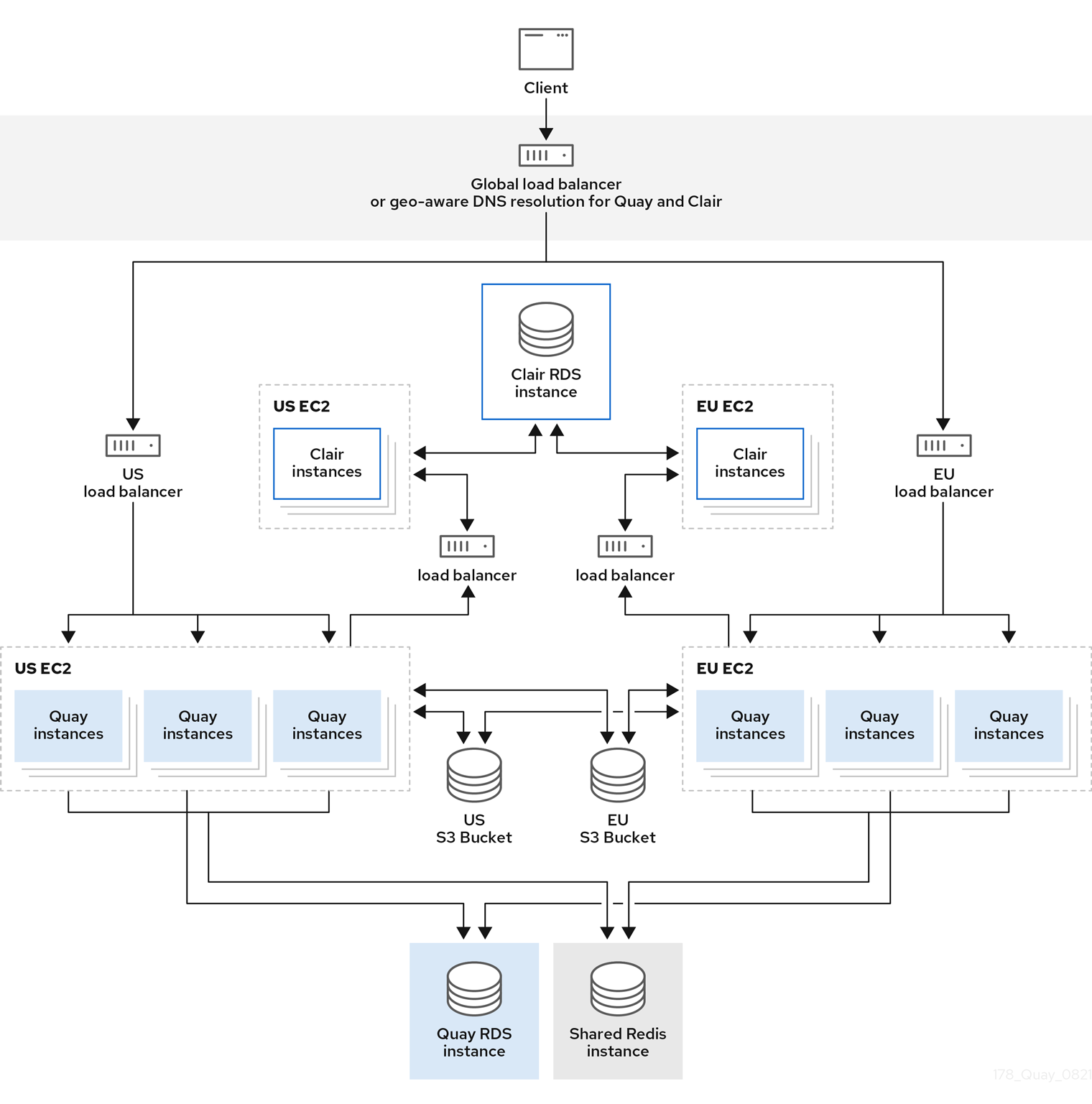
In the following image, Project Quay is running standalone in two separate regions, with a common database and a common Redis instance. Localized image storage is provided in each region and image pulls are served from the closest available storage engine. Container image pushes are written to the preferred storage engine for the Project Quay instance, and are then replicated in the background to the other storage engines.
|
Note
|
If Clair fails in one cluster, for example, the US cluster, US users would not see vulnerability reports in Project Quay for the second cluster (EU). This is because all Clair instances have the same state. When Clair fails, it is usually because of a problem within the cluster. |
Operator geo-replication architecture
Project Quay geo-replication on OpenShift Container Platform uses the Operator in multiple regions with a shared database and Redis and localized storage per region. Image pulls use the closest storage and pushes replicate in the background for distributed users.
In the following example, the Project Quay Operator is deployed in two separate regions, with a common database and a common Redis instance. Localized image storage is provided in each region and image pulls are served from the closest available storage engine. Container image pushes are written to the preferred storage engine for the Quay instance, and are then replicated in the background to the other storage engines.
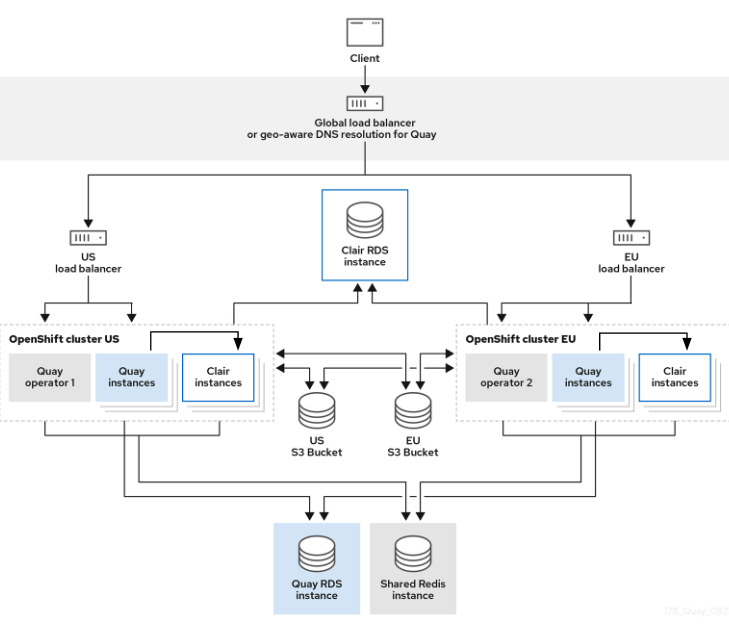
Because the Operator now manages the Clair security scanner and its database separately, geo-replication setups can be leveraged so that they do not manage the Clair database. Instead, an external shared database would be used. Project Quay and Clair support several providers and vendors of PostgreSQL, which can be found in the Project Quay 3.x test matrix. Additionally, the Operator also supports custom Clair configurations that can be injected into the deployment, which allows users to configure Clair with the connection credentials for the external database.
Mixed storage for geo-replication
Geo-replication in Project Quay can use mixed storage backends, such as public-cloud object storage and on-premise Ceph, when you secure cross-site access appropriately.
Because geo-replication supports multiple replication targets, Red Hat recommends that you use a VPN or token pair with bucket-specific access to meet security requirements. This results in the public cloud instance of Project Quay having access to on-premise storage, but the network is encrypted, protected, and uses ACLs, thereby meeting security requirements. If you cannot implement these security measures, it might be preferable to deploy two distinct Project Quay registries and to use repository mirroring as an alternative to geo-replication.
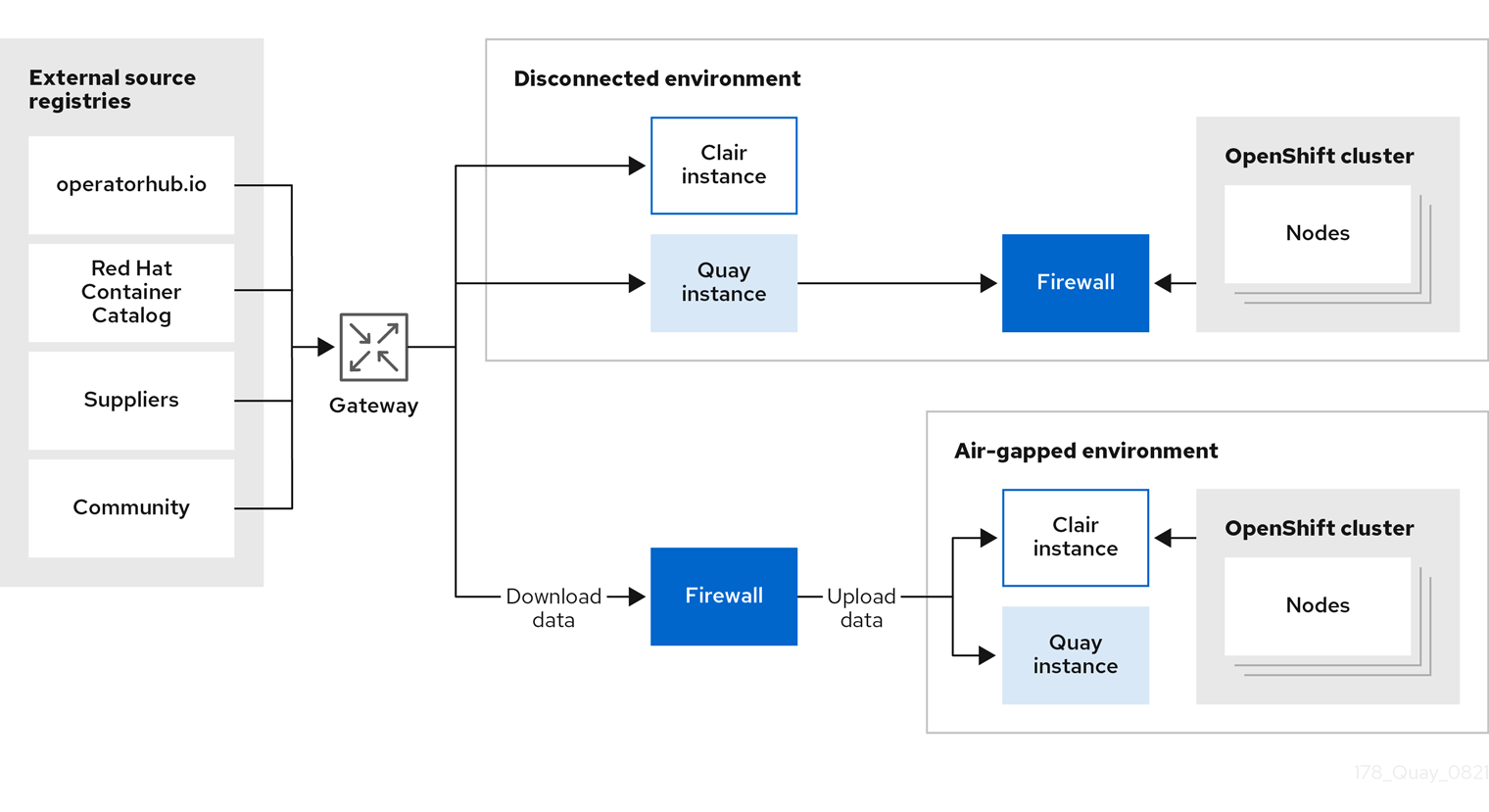
Air-gapped or disconnected deployments
Project Quay supports air-gapped and disconnected deployments with internet-connected registries and firewall access, or fully disconnected installations with offline media transfer. You can choose the pattern that matches your network constraints.
In the following diagram, the upper deployment in the diagram shows Project Quay and Clair connected to the internet, with an air-gapped OpenShift Container Platform cluster accessing the Project Quay registry through an explicit, allowlisted hole in the firewall.
The lower deployment in the diagram shows Project Quay and Clair running inside of the firewall, with image and CVE data transferred to the target system using offline media. The data is exported from a separate Project Quay and Clair deployment that is connected to the internet.
Plan container image builds with Red Hat Quay
Review Red Hat Quay build worker options, build architecture, and OpenShift route limitations to decide whether in-registry builds fit your pipeline.
Container image builds
Project Quay can build container images from Dockerfiles on worker nodes. You can start builds manually or automatically from source-control events so that registry images stay aligned with your code.
Builds are supported on Red Hat Quay on OpenShift Container Platform and Kubernetes. A build manager coordinates build jobs. You can run builders on bare metal nodes or as virtual (unprivileged container) builders, depending on isolation needs and available infrastructure.
When you plan builds, decide whether Project Quay should own image builds in your pipeline or whether an external CI system should push finished images into the registry. If you use Project Quay builds, choose a builder strategy and confirm networking constraints for your cluster.
|
Note
|
Running builds directly in a container on bare metal does not provide the same isolation as virtual machines, but it still provides meaningful process isolation. |
Bare metal builds
Bare metal builds run Project Quay build workers on physical Red Hat Quay on OpenShift Container Platform or Kubernetes nodes so you can use existing hardware capacity for Dockerfile builds.
Use bare metal builds when you want builders on dedicated worker nodes and can accept container-level isolation rather than a full virtual machine per build. Plan for labeled worker nodes that can schedule build pods, a builder service account with the required permissions, and network access from builders to the build manager and to your Git sources.
Configure bare metal builder infrastructure when you are ready to implement builds; planning focuses on node capacity, isolation tradeoffs, and whether bare metal or virtual builders better match your security model.
Virtual builds
Virtual builds in Project Quay run build workers in unprivileged containers on Red Hat Quay on OpenShift Container Platform. This approach provides process isolation without requiring a dedicated virtual machine for each build.
With virtual builds, the build manager creates a Kubernetes Job that starts a pod from the builder image. That image includes the builder binary and Podman. The pod runs unprivileged; the builder builds the image and reports status to the build manager.
Virtual builds limitations
The following limitations apply to virtual builds:
-
Running virtual builds in an unprivileged context might cause some Dockerfile commands that worked under a previous build strategy to fail. Changing build strategy can also affect build performance and reliability.
-
Running virtual builds directly in a container does not provide the same isolation as virtual machines. Changing the build environment might cause builds that previously succeeded to fail.
Builds limitations with managed routes
Project Quay builds have networking constraints when Red Hat Quay on OpenShift Container Platform uses managed routes. Plan for these constraints so build workers can reach the build manager.
OpenShift Container Platform routes typically serve traffic on a single port. Because builds use gRPC, the Operator creates a dedicated Route that directs that traffic to the build manager.
When you plan builds on OpenShift Container Platform, account for the following:
-
OpenShift ingress must support HTTP/2 for the gRPC protocol used by the build manager.
-
The build manager needs the build cluster CA certificate in the Project Quay configuration so workers can establish a secure connection.
-
Build jobs must resolve the build manager hostname. Custom subdomains require DNS that points to the OpenShift router.
See "Configuring Project Quay builds for managed routes" for implementation steps.